
- Forums
- Product Forums
- General Purpose MicrocontrollersGeneral Purpose Microcontrollers
- i.MX Forumsi.MX Forums
- QorIQ Processing PlatformsQorIQ Processing Platforms
- Identification and SecurityIdentification and Security
- Power ManagementPower Management
- Wireless ConnectivityWireless Connectivity
- RFID / NFCRFID / NFC
- Advanced AnalogAdvanced Analog
- Neural Processing UnitsNeural Processing Units
- MCX Microcontrollers
- S32G
- S32K
- S32V
- MPC5xxx
- Other NXP Products
- S12 / MagniV Microcontrollers
- Powertrain and Electrification Analog Drivers
- Sensors
- Vybrid Processors
- Digital Signal Controllers
- 8-bit Microcontrollers
- ColdFire/68K Microcontrollers and Processors
- PowerQUICC Processors
- OSBDM and TBDML
- S32M
- S32Z/E
-
- Solution Forums
- Software Forums
- MCUXpresso Software and ToolsMCUXpresso Software and Tools
- CodeWarriorCodeWarrior
- MQX Software SolutionsMQX Software Solutions
- Model-Based Design Toolbox (MBDT)Model-Based Design Toolbox (MBDT)
- FreeMASTER
- eIQ Machine Learning Software
- Embedded Software and Tools Clinic
- S32 SDK
- S32 Design Studio
- GUI Guider
- Zephyr Project
- Voice Technology
- Application Software Packs
- Secure Provisioning SDK (SPSDK)
- Processor Expert Software
- Generative AI & LLMs
-
- Topics
- Mobile Robotics - Drones and RoversMobile Robotics - Drones and Rovers
- NXP Training ContentNXP Training Content
- University ProgramsUniversity Programs
- Rapid IoT
- NXP Designs
- SafeAssure-Community
- OSS Security & Maintenance
- Using Our Community
-
- Cloud Lab Forums
-
- Knowledge Bases
- ARM Microcontrollers
- i.MX Processors
- Identification and Security
- Model-Based Design Toolbox (MBDT)
- QorIQ Processing Platforms
- S32 Automotive Processing Platform
- Wireless Connectivity
- CodeWarrior
- MCUXpresso Suite of Software and Tools
- MQX Software Solutions
- RFID / NFC
- Advanced Analog
- Neural Processing Units
-
- NXP Tech Blogs
- Home
- :
- 汎用マイクロコントローラ
- :
- LPCマイクロコントローラ
- :
- Unable to detect Core Jtag after Lossing connection while Debugging LPC4367
Unable to detect Core Jtag after Lossing connection while Debugging LPC4367
- RSS フィードを購読する
- トピックを新着としてマーク
- トピックを既読としてマーク
- このトピックを現在のユーザーにフロートします
- ブックマーク
- 購読
- ミュート
- 印刷用ページ
Unable to detect Core Jtag after Lossing connection while Debugging LPC4367

- 新着としてマーク
- ブックマーク
- 購読
- ミュート
- RSS フィードを購読する
- ハイライト
- 印刷
- 不適切なコンテンツを報告
Hi,
I am working on one of the project where i am using LPC4367JBD208 Controller. I am using MCUXpesso 10.3.1_2233 for my application development and LPC Link 2 CMSIS DAP for debugging
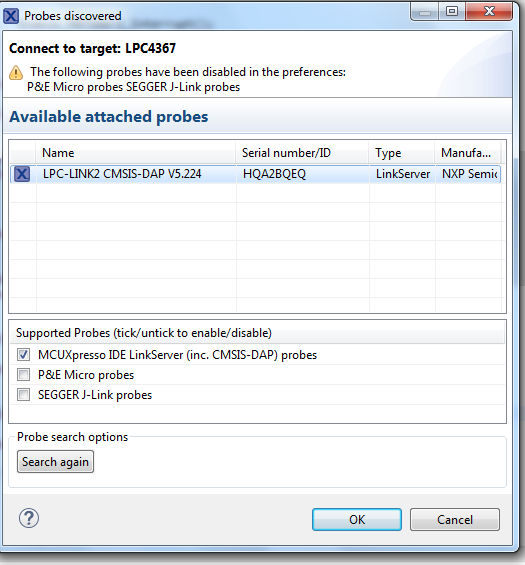
I was debugging my application with M4 core and M0App core loaded. But suddenly the debug connection of M0App terminated. So i tried to relaunch M0App core only. But then both the Debug connection (M4 andM0App core) got terminated.
After that i tried to relaunch the debug session then it started showing below mentioned error.
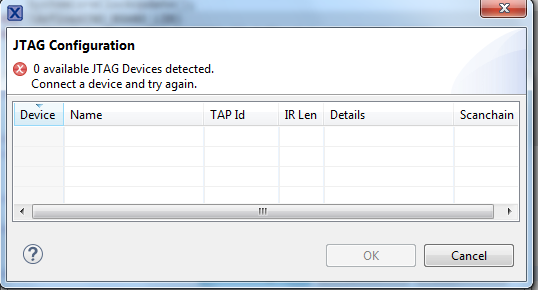
Then i loaded the code of M4 Core using GUI Flash tool
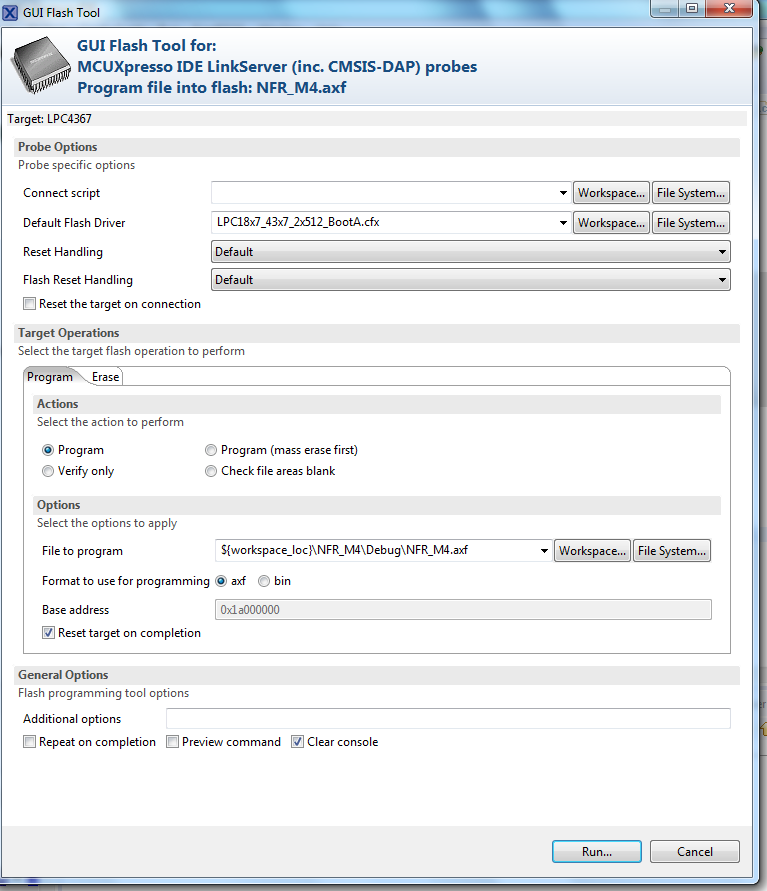
I was able to load the code in M4 Core and then i tried to relauch the debug conection but still the same error, 0Jtag Available. Then i tried to debug tthe M4 Core with SWD configuration there i was able to debug the core twice but then when i tried to load the code in M0App core using GUI glash tool it is not getting loaded.
Then i tried Regaining debug access to target MCU mthern which was working for me but now this also not working. As a result not able to do Mass erase. It is showing below mention error
Executing flash operation 'Erase' (Erase flash) - Wed Jul 29 16:19:51 IST 2020
Checking MCU info...
Scanning for targets...
Executing flash action...
MCUXpresso IDE RedlinkMulti Driver v10.3 (Feb 7 2019 22:50:02 - crt_emu_cm_redlink.exe build 760)
( 0) Reading remote configuration
Wc(03). No cache support.
Found chip XML file in D:/GAURAV MORE/PROJECTS/NEW FEEDER RELAY/ESE/Code/CPU/MCUXpresso10.3.1/July20/F4_CPU_28July2020/NFR_M4/Debug\LPC4367.xml
( 5) Remote configuration complete
Reconnected to existing link server
Connecting to probe 1 core 0 (using server started externally) gave 'Ee(42). Could not connect to core.'
Connecting to probe 1 core 0 (using server started externally) gave 'Ee(42). Could not connect to core.'
Connecting to probe 1 core 0 (using server started externally) gave 'Ee(42). Could not connect to core.'
Server OK but no connection to probe 1 core 0 (after 3 attempts) - Ee(42). Could not connect to core.
Failed on connect: Ee(42). Could not connect to core.
No connection to chip's debug port
(100) Target Connection Failed
Unable to perform operation!
Command failed with exit code 1
This happen when suddenly the debug session got Disconnected while debugging the application.
Please resolve the issue on urgent basis.
- 新着としてマーク
- ブックマーク
- 購読
- ミュート
- RSS フィードを購読する
- ハイライト
- 印刷
- 不適切なコンテンツを報告
Hi,
Considering the above issue raised by me
discussed I also tried some solutions at the back ground by referring some forums discussion. Unable to connect to core and Regaining debug access to target MCU and tried to erase using GUI flash tools. following is the error log I got,
Ni: LPCXpresso RedlinkMulti Driver v8.2 (Sep 5 2016 10:12:38 - crt_emu_cm_redlink.exe build 725)
Pc: ( 0) Reading remote configuration
Nc: Found chip XML file in D:/GAURAV MORE/TEAM/GAURAV/Test Codes/LPC4367/LPCXpresso/SDRAM_TestCode_Working/SDRAM_TestPrj/Debug/LPC4367.xml
Pc: ( 5) Remote configuration complete
Nc: connecting to core 0 with handle 0x0 (using server PID -1) gave rc 'Ee(36). Could not connect to core.'
Nc: connecting to core 0 with handle 0x0 (using server PID -1) gave rc 'Ee(36). Could not connect to core.'
Nc: connecting to core 0 with handle 0x0 (using server PID -1) gave rc 'Ee(36). Could not connect to core.'
Nc: probe unbooted? no core 0?
Ed:02: Failed on connect: Ee(36). Could not connect to core.
Et:31: No connection to emulator device
Pc: (100) Target Connection Failed
I was able to debug the code twice and then i terminate the code and power on the board and then again tried the program then i am not able to connect the core and then tried to mass erase after running the Regaining debug access to target MCU methods but then i got the above mentioned error. I have also attached the codes for your reference which i was able to debug and now not able to debug.
Request you to please go through the same and let me know the issue since I am not able to proceed for my development due to such problems.
Thanks
Gaurav More

- 新着としてマーク
- ブックマーク
- 購読
- ミュート
- RSS フィードを購読する
- ハイライト
- 印刷
- 不適切なコンテンツを報告
In regaining debug access, Boot into ISP will always recover your board, unless you have disabled ISP in your code. Other possibilities are the chip is broken (unlikely) or you are not supplying sufficient power, or your USB cable is faulty, or your computer USB port is fault.
- 新着としてマーク
- ブックマーク
- 購読
- ミュート
- RSS フィードを購読する
- ハイライト
- 印刷
- 不適切なコンテンツを報告
I did the following steps as per your inputs,
First to know there is already one programm runnug in the controller. I removed the Jtag connector and then as per the instructions in the regaining the debug access it put thcontroller in Bootloader mode. this is cn confirm by seeing that the code which runs LED blinking function in the code stops as a result the LED is not blinking. This i checked for longer time . But then i connect eh JTag and tried to mass erae using GUI flash tool.but it dd not worked.
feel like the cotroller core connection is loset but the reason not clear. One more query is that Code Red protection Enable is ticked in the properties in Managed linker script. Is it the reason for losing the core connection suddenly. not able to get the actual reason. Also is checked the forum LPC43xx killed on ISP conection but not able to get the solution.
How to check that ISP in your code in the code? Pls let me know i will check it in my code.
Thanks
Gaurav More
- 新着としてマーク
- ブックマーク
- 購読
- ミュート
- RSS フィードを購読する
- ハイライト
- 印刷
- 不適切なコンテンツを報告
- 新着としてマーク
- ブックマーク
- 購読
- ミュート
- RSS フィードを購読する
- ハイライト
- 印刷
- 不適切なコンテンツを報告
Hi Con Verse,
Reagrding the issue mentioned I am not able to get any solution. I have tried the link of regaining the controller access but no success.
Can we use Jlink comander to bring the controller out from this mode or to know whether the controller is in brick mode?
Since I feel there is some issue with MCU Xpresso since every time while debugging only it created this issue and the controller gets locked. But the question arises that even if it is hanged how it is locking the controller since it happens while debugging yesterday,
I was in debugging mode before that i made modification in the project settings where i unticked the CRP box from the project by referring the project setting of the sample code. this was the suggestion given by the NXP team member from banglore. but still the issue persist.
need to know that similar the kinetis controller can we use Jling debugger to bring teh controller fro lock mode using the script similar to the kinetis. Is there nay such method available to check. Since ihave almost 5 such controller in locked mode and due to this I am not able to proceed for the development.
It is very urgent for me to get the solution. Please suggest the solution for the same apart from the regaining the controller acces procedure.
Thanks
Gaurav More
- 新着としてマーク
- ブックマーク
- 購読
- ミュート
- RSS フィードを購読する
- ハイライト
- 印刷
- 不適切なコンテンツを報告
Similar observation is there with my new development board. i ws able to debug the code. i put the LEd code and i was testing and hen i put SDRAM code then also i was able to debug but when i remove the debugger and power on the board the code was running inside but then after i tried to debug then again it gives the above mentioned error.
I tested it with LPC Xpresso V8.2.2,
Please provid the solution snce i am not able to process for the development due to this random behaviour.
Thanks,
Gaurav More
- 新着としてマーク
- ブックマーク
- 購読
- ミュート
- RSS フィードを購読する
- ハイライト
- 印刷
- 不適切なコンテンツを報告
I have already tried this and also mentioned the result after trying this in the above data.
Thanks
Gaurav More
