
- Forums
- Product Forums
- General Purpose MicrocontrollersGeneral Purpose Microcontrollers
- i.MX Forumsi.MX Forums
- QorIQ Processing PlatformsQorIQ Processing Platforms
- Identification and SecurityIdentification and Security
- Power ManagementPower Management
- Wireless ConnectivityWireless Connectivity
- RFID / NFCRFID / NFC
- Advanced AnalogAdvanced Analog
- Neural Processing UnitsNeural Processing Units
- MCX Microcontrollers
- S32G
- S32K
- S32V
- MPC5xxx
- Other NXP Products
- S12 / MagniV Microcontrollers
- Powertrain and Electrification Analog Drivers
- Sensors
- Vybrid Processors
- Digital Signal Controllers
- 8-bit Microcontrollers
- ColdFire/68K Microcontrollers and Processors
- PowerQUICC Processors
- OSBDM and TBDML
- S32M
- S32Z/E
-
- Solution Forums
- Software Forums
- MCUXpresso Software and ToolsMCUXpresso Software and Tools
- CodeWarriorCodeWarrior
- MQX Software SolutionsMQX Software Solutions
- Model-Based Design Toolbox (MBDT)Model-Based Design Toolbox (MBDT)
- FreeMASTER
- eIQ Machine Learning Software
- Embedded Software and Tools Clinic
- S32 SDK
- S32 Design Studio
- GUI Guider
- Zephyr Project
- Voice Technology
- Application Software Packs
- Secure Provisioning SDK (SPSDK)
- Processor Expert Software
- Generative AI & LLMs
-
- Topics
- Mobile Robotics - Drones and RoversMobile Robotics - Drones and Rovers
- NXP Training ContentNXP Training Content
- University ProgramsUniversity Programs
- Rapid IoT
- NXP Designs
- SafeAssure-Community
- OSS Security & Maintenance
- Using Our Community
-
- Cloud Lab Forums
-
- Knowledge Bases
- ARM Microcontrollers
- i.MX Processors
- Identification and Security
- Model-Based Design Toolbox (MBDT)
- QorIQ Processing Platforms
- S32 Automotive Processing Platform
- Wireless Connectivity
- CodeWarrior
- MCUXpresso Suite of Software and Tools
- MQX Software Solutions
- RFID / NFC
- Advanced Analog
- Neural Processing Units
-
- NXP Tech Blogs
- Home
- :
- MCUXpresso Software and Tools
- :
- Kinetis Software Development Kit
- :
- Re: Trouble with create new project in SDK1.3 with Processor expert
Trouble with create new project in SDK1.3 with Processor expert
- Subscribe to RSS Feed
- Mark Topic as New
- Mark Topic as Read
- Float this Topic for Current User
- Bookmark
- Subscribe
- Mute
- Printer Friendly Page
Trouble with create new project in SDK1.3 with Processor expert

- Mark as New
- Bookmark
- Subscribe
- Mute
- Subscribe to RSS Feed
- Permalink
- Report Inappropriate Content
Hello, community!
I have a trouble with create new project in Kinetis Design Studio 3. I build a SDK1.3 in Kinetis expert for my FRDM-K64f board, unpack it and make a Eclipse update in KDS. Installed Processor Expert for Kinetis 3.0.2. I build ksdk_platform_lib and ksdk_ hal_lib. then i create new project with a wizard:
1) select "Kinetis SDK 1.x or Processor expert Project"
2) input project name
3) select device. I try to make a different projects for "board" and "Processor"
4) I select a Kinetis SDK (SDK1.3 for FRDM-K64F and check SDK path; i choose "Processor expert"; I try to make a different projects for "linked" and "standalone"; create a project.
5) then i added a processor expert component, for example, I2C (fsl_I2C from KSDK1.3.0 repositories.
6) generate a processor expert code and build project and...
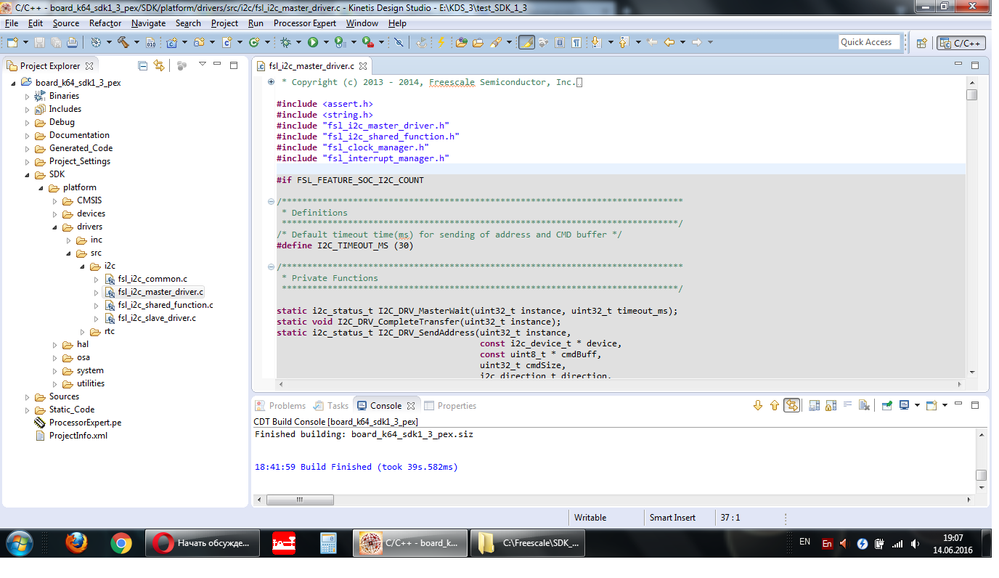
7) my project not work. when I look into driver's source file ( /SDK/platform/drivers/src/i2c/fsl_i2c_master_driver.c) i see, what all the driver functions is not active, because "FSL_FEATURE_SOC_I2C_COUNT" is "false"
8) i try to add another components but get same result...
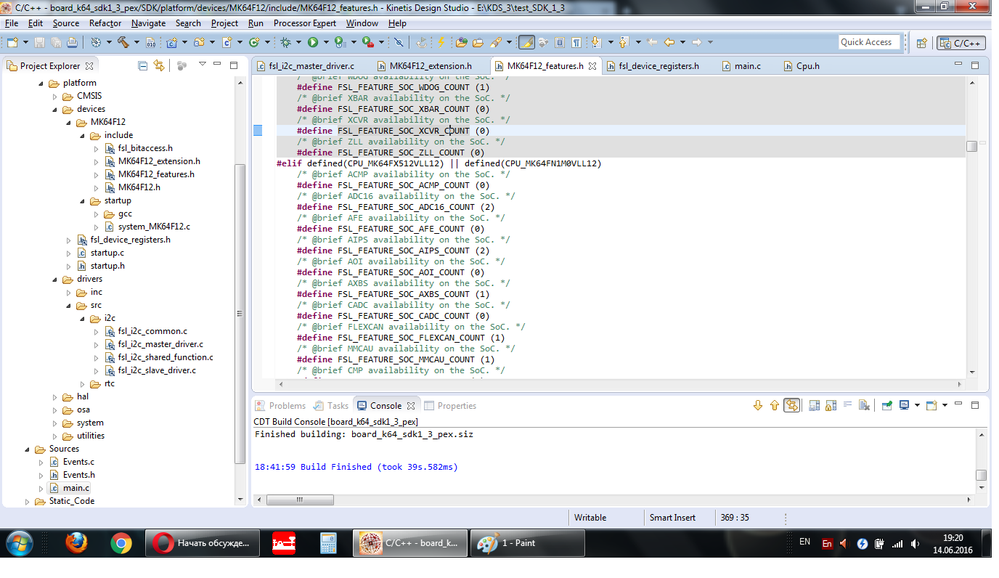
"FSL_FEATURE_SOC_I2C_COUNT" and other peripheria defined in file "MK64F12_features.h" which called from "fsl_device_registers.h" which called from "Cpu.h" which include in main.c
I really don't understanding, why "feature defines" (active for my CPU in "MK64F12_features.h") not work.
Hope for HELP!!!
Regards, Oleg

 ivadorazinova
- Mark as New
- Bookmark
- Subscribe
- Mute
- Subscribe to RSS Feed
- Permalink
- Report Inappropriate Content
Hello Oleg,
please can you attach your project?
Best Regards,
Iva
- Mark as New
- Bookmark
- Subscribe
- Mute
- Subscribe to RSS Feed
- Permalink
- Report Inappropriate Content
Hello, Iva! thanks for Your reply!
in attachment 2 clear(without my procedures) projects, create in Kinetis Design Studio v3.2 with all Updates; installed SDK1.3 for FRDM-K64F, my system is Windows 7 32-bit..
one project for "board" and one for "processor" in project wizard.
I added in this projects 2 processor expert components - fsl_I2C and fsl_SAI. You can see in the driver's source files (SDK\drivers\src\I2c or \sai) that the drivers functions is not active.
if you make a ! change in "fsl_device_registers.h" as I have indicated above, all will be OK.
I hope you can figure this out.
Regards, Oleg
ivadorazinova
- Mark as New
- Bookmark
- Subscribe
- Mute
- Subscribe to RSS Feed
- Permalink
- Report Inappropriate Content
Hi Oleg.
Many thanks for pointing out this !
I can confirm the same results also on my side.
I already reported the issue to Application Team and wait for the response.
I will keep you informed.
Many
- Mark as New
- Bookmark
- Subscribe
- Mute
- Subscribe to RSS Feed
- Permalink
- Report Inappropriate Content
I continued my experiments. I re-install KDS 3.2 and SDK1.3, create new project for FRDM-K64f board (SDK + processor expert) and... all the peripheral driver's functions is not active in driver file.
I install KDS 3.0 and SDK 1.3, create a project and get same result.
I think, this bug in SDK package.
I resolved this issue - in "fsl_device_registers.h" (/SDK/platform/device folder) in define block for my CPU, change a way for MK64F12 header files: #include "MK64F12/include/MK64F12_features.h" to #include <MK64F12/include/MK64F12_features.h>
then rebuild a project and all peripheral driver's functions is ACTIVE!!!
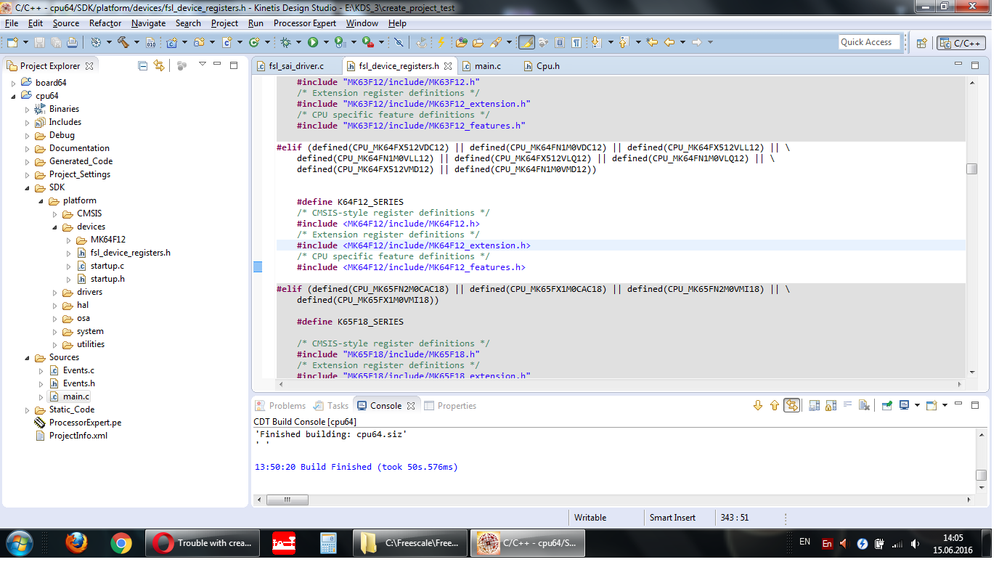
I hope this help somebody and I want get a answer from SDK team about this issue.
Good luck
Oleg
 BlackNight
- Mark as New
- Bookmark
- Subscribe
- Mute
- Subscribe to RSS Feed
- Permalink
- Report Inappropriate Content
Hi Oleg,
I'm not sure if I can follow and see your problem. But if it is about what is grayed out and what is not grayed out in the Eclipse editor view: It could be related to use 'heuristics' in Eclipse. This controls how the 'index' is built which is responsible to gray out or show symbols in the Editor view.
If this is indeed the problem you describe, then have a look here: https://mcuoneclipse.com/2012/03/20/fixing-the-eclipse-index/
Basically you should set the workspace settings to disable heuristics and rebuild the Index.
I hope this helps,
Erich
- Mark as New
- Bookmark
- Subscribe
- Mute
- Subscribe to RSS Feed
- Permalink
- Report Inappropriate Content
Thanks, Erich! I change KDS setting and all OK!
I really don't know what we (developers and enthusiasts) shall do without Your MCUONECLIPSE.COM and your knowledges!
I'm think what User guide for KDS and SDK must have links for Your site in each section :smileyhappy:
Regards, Oleg
