- Forums
- Product Forums
- General Purpose MicrocontrollersGeneral Purpose Microcontrollers
- i.MX Forumsi.MX Forums
- QorIQ Processing PlatformsQorIQ Processing Platforms
- Identification and SecurityIdentification and Security
- Power ManagementPower Management
- Wireless ConnectivityWireless Connectivity
- RFID / NFCRFID / NFC
- Advanced AnalogAdvanced Analog
- Neural Processing UnitsNeural Processing Units
- MCX Microcontrollers
- S32G
- S32K
- S32V
- MPC5xxx
- Other NXP Products
- S12 / MagniV Microcontrollers
- Powertrain and Electrification Analog Drivers
- Sensors
- Vybrid Processors
- Digital Signal Controllers
- 8-bit Microcontrollers
- ColdFire/68K Microcontrollers and Processors
- PowerQUICC Processors
- OSBDM and TBDML
- S32M
- S32Z/E
-
- Solution Forums
- Software Forums
- MCUXpresso Software and ToolsMCUXpresso Software and Tools
- CodeWarriorCodeWarrior
- MQX Software SolutionsMQX Software Solutions
- Model-Based Design Toolbox (MBDT)Model-Based Design Toolbox (MBDT)
- FreeMASTER
- eIQ Machine Learning Software
- Embedded Software and Tools Clinic
- S32 SDK
- S32 Design Studio
- GUI Guider
- Zephyr Project
- Voice Technology
- Application Software Packs
- Secure Provisioning SDK (SPSDK)
- Processor Expert Software
- Generative AI & LLMs
-
- Topics
- Mobile Robotics - Drones and RoversMobile Robotics - Drones and Rovers
- NXP Training ContentNXP Training Content
- University ProgramsUniversity Programs
- Rapid IoT
- NXP Designs
- SafeAssure-Community
- OSS Security & Maintenance
- Using Our Community
-
- Cloud Lab Forums
-
- Knowledge Bases
- ARM Microcontrollers
- i.MX Processors
- Identification and Security
- Model-Based Design Toolbox (MBDT)
- QorIQ Processing Platforms
- S32 Automotive Processing Platform
- Wireless Connectivity
- CodeWarrior
- MCUXpresso Suite of Software and Tools
- MQX Software Solutions
- RFID / NFC
- Advanced Analog
- Neural Processing Units
-
- NXP Tech Blogs
- Home
- :
- 汎用マイクロコントローラ
- :
- Kinetisマイクロコントローラ
- :
- Re: TWR-K40D100M WORKING
TWR-K40D100M WORKING
- RSS フィードを購読する
- トピックを新着としてマーク
- トピックを既読としてマーク
- このトピックを現在のユーザーにフロートします
- ブックマーク
- 購読
- ミュート
- 印刷用ページ

- 新着としてマーク
- ブックマーク
- 購読
- ミュート
- RSS フィードを購読する
- ハイライト
- 印刷
- 不適切なコンテンツを報告
Hi, This is keerthana. I am new to free scale products. I am currently working in TWR-K40D100M DEVELOPMENT BOARD. How can I import GPIO example code using CodeWarrier IDE. I had found example code in codewarrier for MK40DX256. But PK40DX256 in TWR-K40DX development board. please let me know.
解決済! 解決策の投稿を見る。

 DavidS
- 新着としてマーク
- ブックマーク
- 購読
- ミュート
- RSS フィードを購読する
- ハイライト
- 印刷
- 不適切なコンテンツを報告
Hi Keerthana,
The project example you reference is for the older initial TWR-K40DX256 tower board.
To get a baremetal projects you can do the following:
From the http://www.freescale.com/tower web site you can find the Kinetis TWR-K40D100M product page by clicking plus logo next to "MCU and Processor Modules" then click on "Kinetis MCU Modules". Then click on the TWR-K40D100M.
Short cut link to TWR-K40D100M product page.
Now click on the Download tab, then scroll to bottom of page and Download the "Kinetis 100MHz Rev 2 Example Projects".
Kinetis 100MHz Rev 2 Example Projects (REV 1.0)
Kinetis 100MHz Rev 2 Example Projects.
- ZIP (722.5 kB) KINETIS512_V2_SC
If you want an RTOS that supports the TWR-K40D100M, you can get the MQX RTOS from http://www.freescale.com/MQX .
Regards,
David
DavidS
- 新着としてマーク
- ブックマーク
- 購読
- ミュート
- RSS フィードを購読する
- ハイライト
- 印刷
- 不適切なコンテンツを報告
Hi Keerthana,
The project example you reference is for the older initial TWR-K40DX256 tower board.
To get a baremetal projects you can do the following:
From the http://www.freescale.com/tower web site you can find the Kinetis TWR-K40D100M product page by clicking plus logo next to "MCU and Processor Modules" then click on "Kinetis MCU Modules". Then click on the TWR-K40D100M.
Short cut link to TWR-K40D100M product page.
Now click on the Download tab, then scroll to bottom of page and Download the "Kinetis 100MHz Rev 2 Example Projects".
Kinetis 100MHz Rev 2 Example Projects (REV 1.0)
Kinetis 100MHz Rev 2 Example Projects.
- ZIP (722.5 kB) KINETIS512_V2_SC
If you want an RTOS that supports the TWR-K40D100M, you can get the MQX RTOS from http://www.freescale.com/MQX .
Regards,
David
- 新着としてマーク
- ブックマーク
- 購読
- ミュート
- RSS フィードを購読する
- ハイライト
- 印刷
- 不適切なコンテンツを報告
Hello Mr.DavidS,
Thanks for your reply. I have tried the codes which you sent yesterday. But It is not properly built by the compiler. As I am new to CodeWarrier IDE as well as TWR-K40D100, not able to find the cause of the error. But Code Given in this link https://community.freescale.com/docs/DOC-1023 for LED toggle is working for me.
I want to know the programming basics of TWR-K40D100 . How can I get the documents regarding Programming.
DavidS
- 新着としてマーク
- ブックマーク
- 購読
- ミュート
- RSS フィードを購読する
- ハイライト
- 印刷
- 不適切なコンテンツを報告
Hi Keerthana,
That is a great educational link but it is now old and only worked with the TWR-K40X256 (old initial silicon) and not the TWR-K40D100M (newer silicon).
You can use those resources as a guide but you really need to download and use the code options I presented in last post.
Advice: The TWR-K40 hardware is getting old and having less and less support to it. For training I would recommend purchasing a Freedom board (range from $10-$35) and specifically the FRDM-K64F.
The Freedom boards have most recent support in the KDS (Kinetis Design Studio IDE) and KSDK (Kinetis SDK). Both are free of charge. KSDK has lots of examples in it. The web site has DOC's and Video's too.
Regards,
David
- 新着としてマーク
- ブックマーク
- 購読
- ミュート
- RSS フィードを購読する
- ハイライト
- 印刷
- 不適切なコンテンツを報告
 DavidS
- 新着としてマーク
- ブックマーク
- 購読
- ミュート
- RSS フィードを購読する
- ハイライト
- 印刷
- 不適切なコンテンツを報告
Hi Keerthana,
When you do the import process, to you copy the project to the workspace (there is a check box for this) or do you leave the files where they are located (check box not checked)?
In general you should not have the check box checked. The files should remain where they are in the folder structure so that the Paths defined in the Project Properties remain valid.
I also as a rule of thumb place my workspace in the root directory of the bare metal code.
Regards,
David
- 新着としてマーク
- ブックマーク
- 購読
- ミュート
- RSS フィードを購読する
- ハイライト
- 印刷
- 不適切なコンテンツを報告
Hello Mr.David,
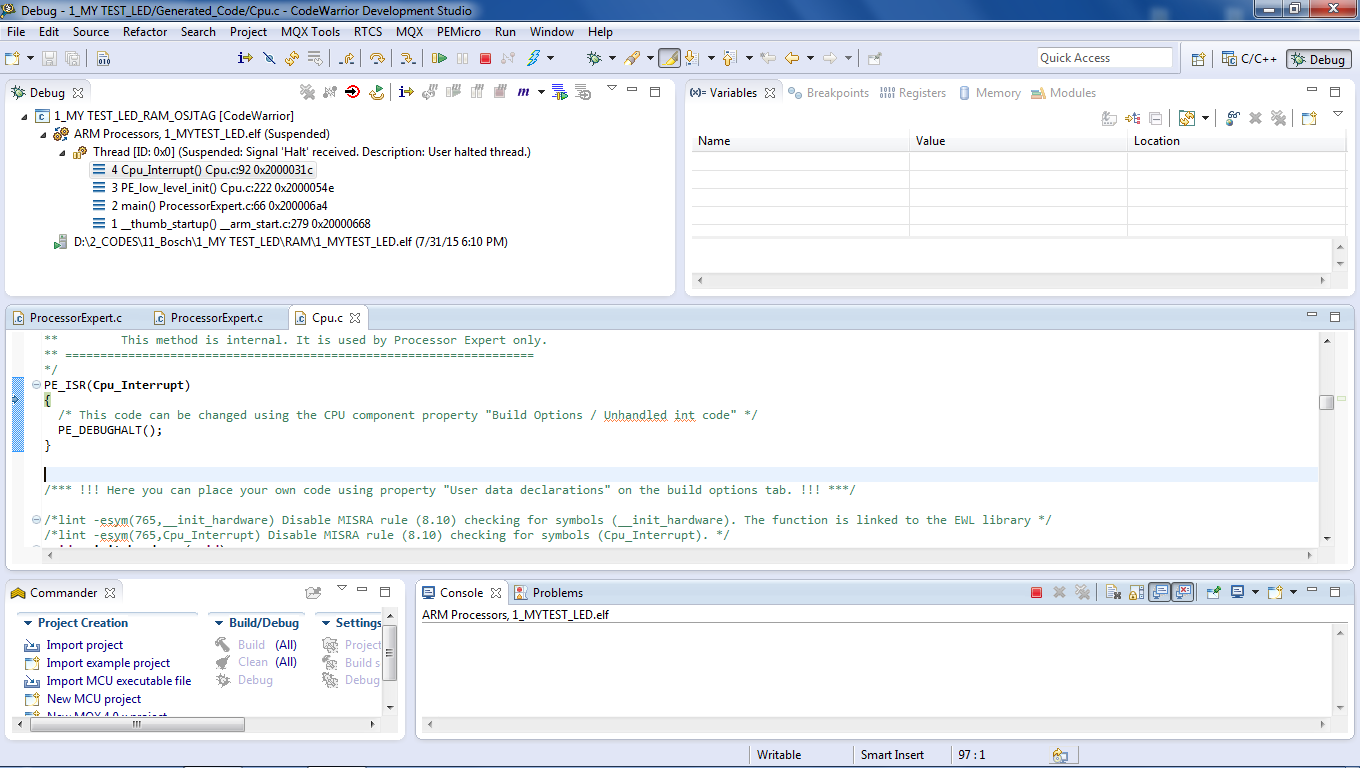
Thank you. Please guide me to create a ProcessorExpert project in codeWarrior . I imported and debug the example project successfully. When I tried to debug my own code in ProcessorExpert, its terminated and points to CPU Interrupt. Not able to find the problem. Please find the attachment
With Regards,
Keerthana. S