- Forums
- Product Forums
- General Purpose MicrocontrollersGeneral Purpose Microcontrollers
- i.MX Forumsi.MX Forums
- QorIQ Processing PlatformsQorIQ Processing Platforms
- Identification and SecurityIdentification and Security
- Power ManagementPower Management
- Wireless ConnectivityWireless Connectivity
- RFID / NFCRFID / NFC
- Advanced AnalogAdvanced Analog
- Neural Processing UnitsNeural Processing Units
- MCX Microcontrollers
- S32G
- S32K
- S32V
- MPC5xxx
- Other NXP Products
- S12 / MagniV Microcontrollers
- Powertrain and Electrification Analog Drivers
- Sensors
- Vybrid Processors
- Digital Signal Controllers
- 8-bit Microcontrollers
- ColdFire/68K Microcontrollers and Processors
- PowerQUICC Processors
- OSBDM and TBDML
- S32M
- S32Z/E
-
- Solution Forums
- Software Forums
- MCUXpresso Software and ToolsMCUXpresso Software and Tools
- CodeWarriorCodeWarrior
- MQX Software SolutionsMQX Software Solutions
- Model-Based Design Toolbox (MBDT)Model-Based Design Toolbox (MBDT)
- FreeMASTER
- eIQ Machine Learning Software
- Embedded Software and Tools Clinic
- S32 SDK
- S32 Design Studio
- GUI Guider
- Zephyr Project
- Voice Technology
- Application Software Packs
- Secure Provisioning SDK (SPSDK)
- Processor Expert Software
- Generative AI & LLMs
-
- Topics
- Mobile Robotics - Drones and RoversMobile Robotics - Drones and Rovers
- NXP Training ContentNXP Training Content
- University ProgramsUniversity Programs
- Rapid IoT
- NXP Designs
- SafeAssure-Community
- OSS Security & Maintenance
- Using Our Community
-
- Cloud Lab Forums
-
- Knowledge Bases
- ARM Microcontrollers
- i.MX Processors
- Identification and Security
- Model-Based Design Toolbox (MBDT)
- QorIQ Processing Platforms
- S32 Automotive Processing Platform
- Wireless Connectivity
- CodeWarrior
- MCUXpresso Suite of Software and Tools
- MQX Software Solutions
- RFID / NFC
- Advanced Analog
- Neural Processing Units
-
- NXP Tech Blogs
- Home
- :
- General Purpose Microcontrollers
- :
- Kinetis Microcontrollers
- :
- Re: MK60F12.h
MK60F12.h
- Subscribe to RSS Feed
- Mark Topic as New
- Mark Topic as Read
- Float this Topic for Current User
- Bookmark
- Subscribe
- Mute
- Printer Friendly Page
MK60F12.h

- Mark as New
- Bookmark
- Subscribe
- Mute
- Subscribe to RSS Feed
- Permalink
- Report Inappropriate Content
Hello.
I try to program a TWR-K60F120M using CodeWarrior. The file MK60F12.h is included in the sample main.c program. Is anywhere description of the file? It seems that the macro GPIO_PIN(10) refers to the blue LED. How will the argument of the GPIO_PIN need to change in order to refer to the green, yellow and red lights?

 adriancano
- Mark as New
- Bookmark
- Subscribe
- Mute
- Subscribe to RSS Feed
- Permalink
- Report Inappropriate Content
Hi,
It seems that you are running the gpio example, is that right? If it is like that then you can find in the gpio_k60.c file the next macros:
#define GPIO_PIN_MASK 0x1Fu
#define GPIO_PIN(x) (((1)<<(x & GPIO_PIN_MASK)))
And in the code you find the line:
GPIOA_PTOR&=~GPIO_PDOR_PDO(GPIO_PIN(10));
And this one turns the BLUE led
You can change the value of the x in the macro GPIO_PIN(x) to change the value pin of each led. According to the schematic (TWR-K60 SCH)
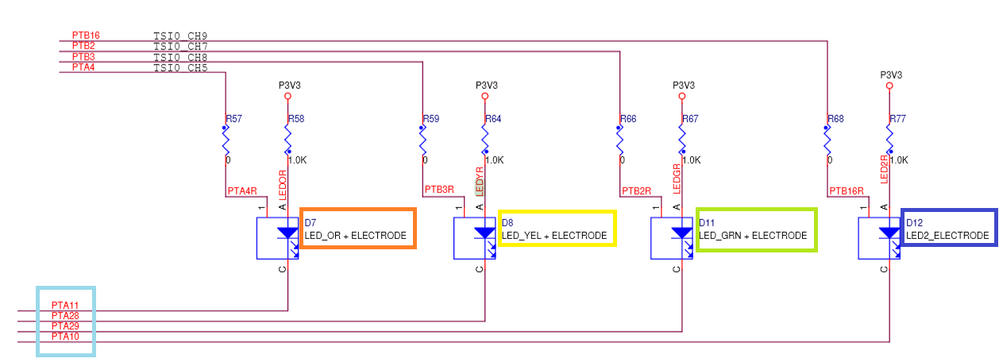
You can wirte:
GPIO_PIN(10) --> BLUE LED
GPIO_PIN(29) --> GREEN LED
GPIO_PIN(28) --> YELLOW LED
GPIO_PIN(11) --> ORANGE LED
I hope this information can help you.
Regards,
-----------------------------------------------------------------------------------------------------------------------
Note: If this post answers your question, please click the Correct Answer button. It would be nice!
-----------------------------------------------------------------------------------------------------------------------
- Mark as New
- Bookmark
- Subscribe
- Mute
- Subscribe to RSS Feed
- Permalink
- Report Inappropriate Content
Hi, Adrian. Thank you so much for your answer. Where can I find the gpio_k60.c file?
adriancano
- Mark as New
- Bookmark
- Subscribe
- Mute
- Subscribe to RSS Feed
- Permalink
- Report Inappropriate Content
What is the file where you can find the macro GPIO_PIN(10)?
But as I told you can wirte:
GPIO_PIN(10) --> BLUE LED
GPIO_PIN(29) --> GREEN LED
GPIO_PIN(28) --> YELLOW LED
GPIO_PIN(11) --> ORANGE LED
Regards,
Adrian
- Mark as New
- Bookmark
- Subscribe
- Mute
- Subscribe to RSS Feed
- Permalink
- Report Inappropriate Content
I found the macro in the file that a friend of mine sent. I have hard time to call the several i/o from my c or assembly (preferable) file. Can you throw some light?
adriancano
- Mark as New
- Bookmark
- Subscribe
- Mute
- Subscribe to RSS Feed
- Permalink
- Report Inappropriate Content
Hi,
If you have CodeWarrior installed you can find an example project which demonstrates the use of the SW buttons in the Tower board using interrupts and toggling the leds. Go to this path in the installation folder: <install folder>\Freescale\CW MCU v10.6\MCU\CodeWarrior_Examples\Kinetis_Examples\k60\gpio In that example you can find the gpio_k60.c file.
Regards.
- Mark as New
- Bookmark
- Subscribe
- Mute
- Subscribe to RSS Feed
- Permalink
- Report Inappropriate Content
Hi, Adrian. Thank you for your reply. Are there any samples in assembly or in c with inline assembly?
adriancano
- Mark as New
- Bookmark
- Subscribe
- Mute
- Subscribe to RSS Feed
- Permalink
- Report Inappropriate Content
Hi,
All the sample codes are in C language but you can check select the disassemble option to see the assembler code of that file, check the image below.
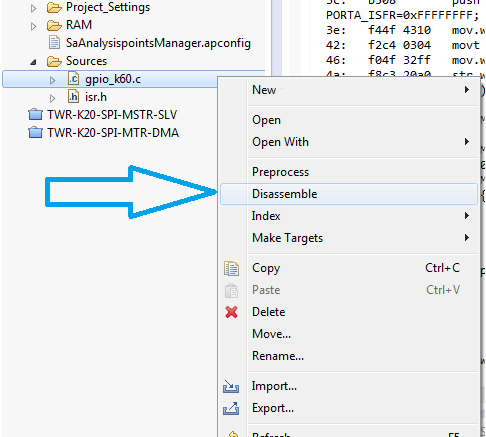
I hope this information can help you.
Regards,
-----------------------------------------------------------------------------------------------------------------------
Note: If this post answers your question, please click the Correct Answer button. It would be nice!
-----------------------------------------------------------------------------------------------------------------------
- Mark as New
- Bookmark
- Subscribe
- Mute
- Subscribe to RSS Feed
- Permalink
- Report Inappropriate Content
Hi, Adrian. You are super. Kassiani
adriancano
- Mark as New
- Bookmark
- Subscribe
- Mute
- Subscribe to RSS Feed
- Permalink
- Report Inappropriate Content
You are welcome, if you questions are now answered please feel free to mark one of this answers as Correct answer.
Kind regards,
Adrian
- Mark as New
- Bookmark
- Subscribe
- Mute
- Subscribe to RSS Feed
- Permalink
- Report Inappropriate Content
How can I mark an answer as correct? I do not see this option.
adriancano
- Mark as New
- Bookmark
- Subscribe
- Mute
- Subscribe to RSS Feed
- Permalink
- Report Inappropriate Content
Hi,
Just below each answer you can see this two buttons.

You can click on them to select correct answer or helpful answer.
Kind regards
- Mark as New
- Bookmark
- Subscribe
- Mute
- Subscribe to RSS Feed
- Permalink
- Report Inappropriate Content
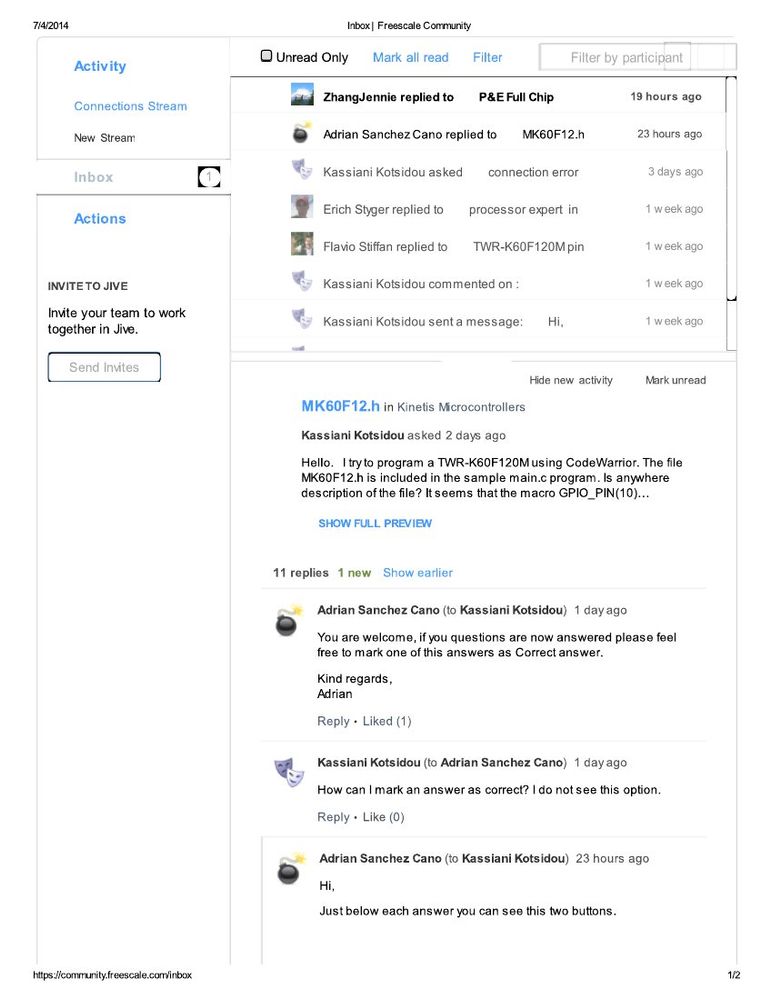
Hi, Adrian. I do not have the buttons you are refering to. Attached is how my inbox looks like.