
- Forums
- Product Forums
- General Purpose MicrocontrollersGeneral Purpose Microcontrollers
- i.MX Forumsi.MX Forums
- QorIQ Processing PlatformsQorIQ Processing Platforms
- Identification and SecurityIdentification and Security
- Power ManagementPower Management
- Wireless ConnectivityWireless Connectivity
- RFID / NFCRFID / NFC
- Advanced AnalogAdvanced Analog
- Neural Processing UnitsNeural Processing Units
- MCX Microcontrollers
- S32G
- S32K
- S32V
- MPC5xxx
- Other NXP Products
- S12 / MagniV Microcontrollers
- Powertrain and Electrification Analog Drivers
- Sensors
- Vybrid Processors
- Digital Signal Controllers
- 8-bit Microcontrollers
- ColdFire/68K Microcontrollers and Processors
- PowerQUICC Processors
- OSBDM and TBDML
- S32M
- S32Z/E
-
- Solution Forums
- Software Forums
- MCUXpresso Software and ToolsMCUXpresso Software and Tools
- CodeWarriorCodeWarrior
- MQX Software SolutionsMQX Software Solutions
- Model-Based Design Toolbox (MBDT)Model-Based Design Toolbox (MBDT)
- FreeMASTER
- eIQ Machine Learning Software
- Embedded Software and Tools Clinic
- S32 SDK
- S32 Design Studio
- GUI Guider
- Zephyr Project
- Voice Technology
- Application Software Packs
- Secure Provisioning SDK (SPSDK)
- Processor Expert Software
- Generative AI & LLMs
-
- Topics
- Mobile Robotics - Drones and RoversMobile Robotics - Drones and Rovers
- NXP Training ContentNXP Training Content
- University ProgramsUniversity Programs
- Rapid IoT
- NXP Designs
- SafeAssure-Community
- OSS Security & Maintenance
- Using Our Community
-
- Cloud Lab Forums
-
- Knowledge Bases
- ARM Microcontrollers
- i.MX Processors
- Identification and Security
- Model-Based Design Toolbox (MBDT)
- QorIQ Processing Platforms
- S32 Automotive Processing Platform
- Wireless Connectivity
- CodeWarrior
- MCUXpresso Suite of Software and Tools
- MQX Software Solutions
- RFID / NFC
- Advanced Analog
- Neural Processing Units
-
- NXP Tech Blogs
- Home
- :
- 通用微控制器
- :
- Kinetis微控制器
- :
- MED-EKG Tower kit Virtual com Port
MED-EKG Tower kit Virtual com Port
MED-EKG Tower kit Virtual com Port

Hi,
I bought a twr k53n512 towerkit with med ekg.I use IAR ide for debugging.I am able to flash the code using iar but after flashing when i connect the usb cable to twr-ser board my system shows "USB not recognized".The virtual com port driver provided with medical gui from nxp doesnt work.Is there any solution for my problem?


Hi Sooryakrishnan U,
Do you refer to the according application note AN4323 and it's software AN4323SW?
From your description, you need to follow the application note, and the MED-EKG_demo_jumper_configuration.pdf in the AN4323SW, you need to configure the jumper in the TWR-K53 and the MED-EKG, then follow the an4334 step install the CDC virtual COM drivers.
Please read the AN4323 carefully, and configure the board's jumper.
Wish it helps you!
If you still have question, please let me know!
Have a great day,
Jingjing
-----------------------------------------------------------------------------------------------------------------------
Note: If this post answers your question, please click the Correct Answer button. Thank you!
-----------------------------------------------------------------------------------------------------------------------
Hi Jingjing,
Thank you for showing interest in my issue.Actually i referred the same doc and got MED-EKG Demo perfectly working.Then for MED-GLU I changed one jumper J4 to 1-2 (which was 2-3 for med-ekg).Though the MED-GLU demo ddnt work,i tried the default jumper configuration for med-ekg.But now i am not getting med-ekg working.I am able to flash the code.But when i connect the twr-ser usb as i already mentioned "USB NOT Recognized"shows, which previously showed virtual comport 5.
Hi Sooryakrishnan U,
Please refer to http://cache.nxp.com/files/analog/doc/app_note/AN4323.pdf?fsrch=1&sr=1&pageNum=1
http://cache.nxp.com/files/analog/doc/app_note/AN4323.pdf?fsrch=1&sr=1&pageNum=1
Page 31, item2, install the COM driver.
Did you install the COM driver?
Jingjing
Hi Jingjing,
Yes, I have installed the com driver.My system is 64 bit and i installed the virtual com driver from Freescale/Med GUI/Drivers/x64/VirtualComPortx64.But now when i try to update the unknown device driver with the com driver i have just shown,it again shows unknown device.I see it like the driver is not getting installed as it got installed when i first used med-ekg demo.
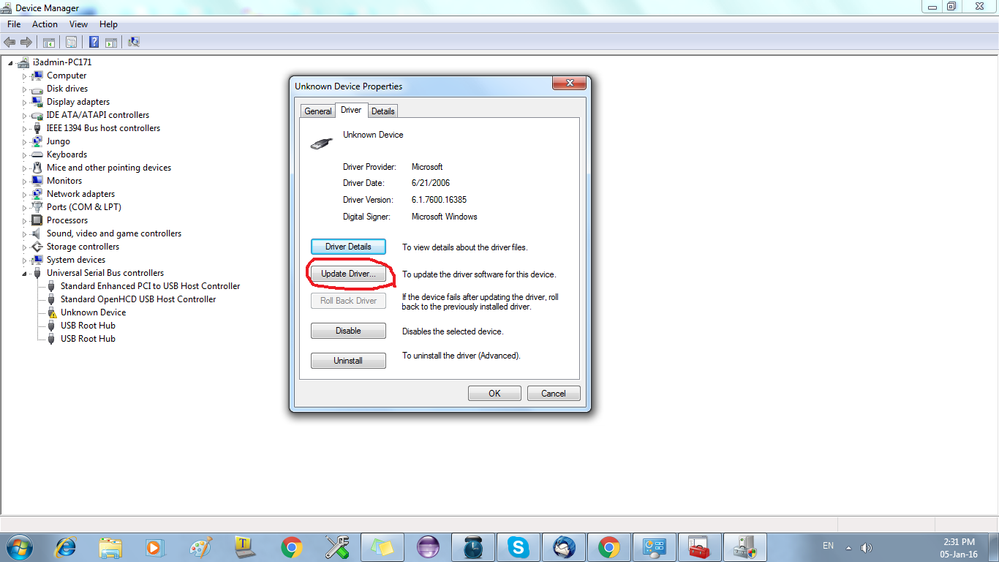
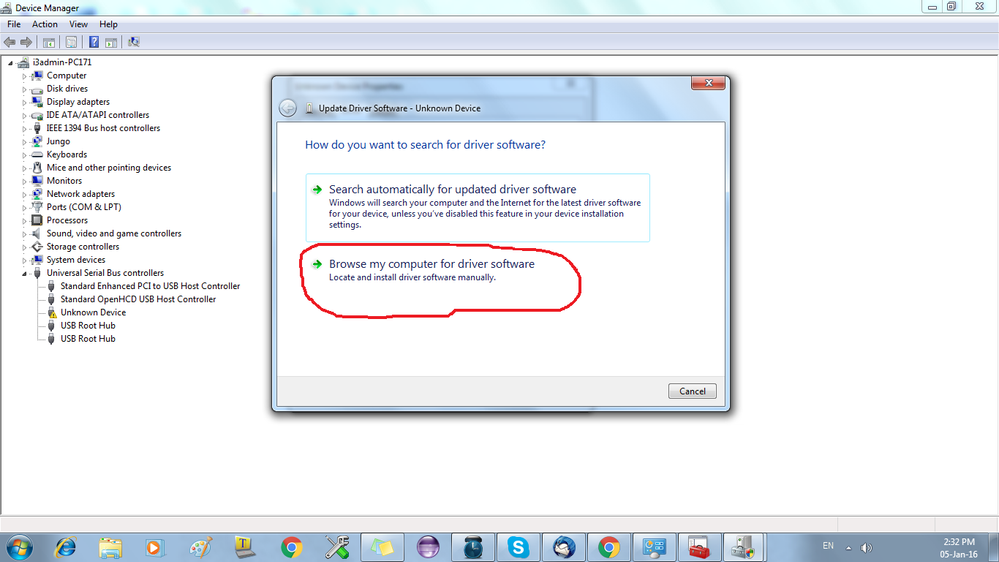
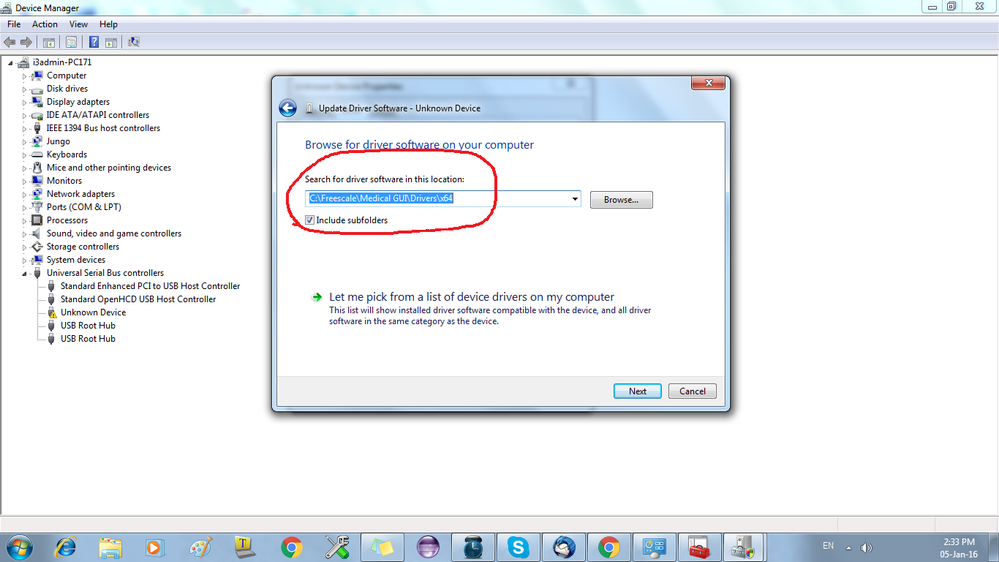
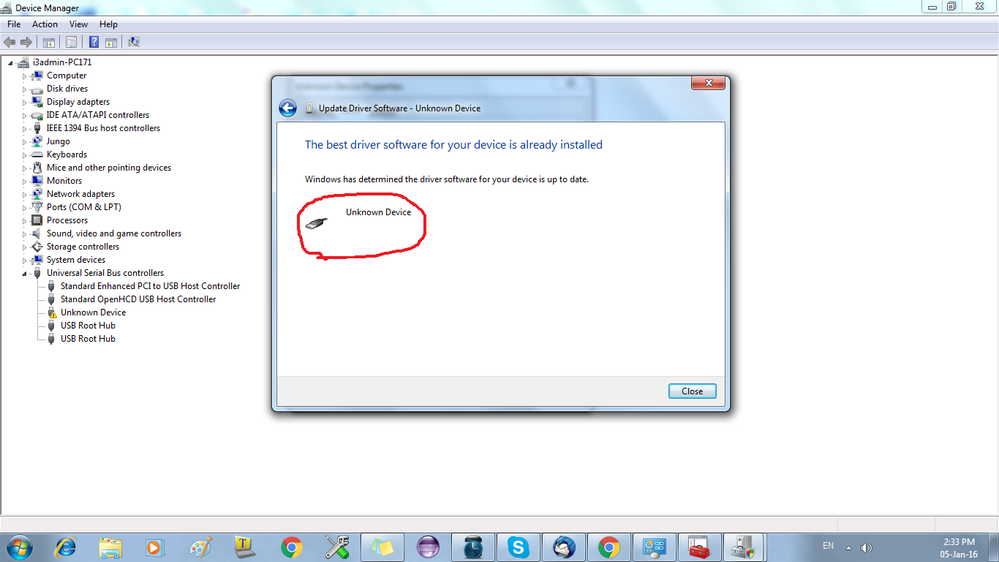
Hi Sooryakrishnan U,
Please refer to the attachment check your jumpers connection in TWR-SER,TWR-K53N512,MED-EKG again.
I follow this document, and download this code to the chip: AN4323SW\MED-EKG\Software\MED-EKG K53\app\cdc\iar_ew\kinetis\MED-EKG K53.eww
Then install the CDC install file which the same process with you, I can find the COM port:
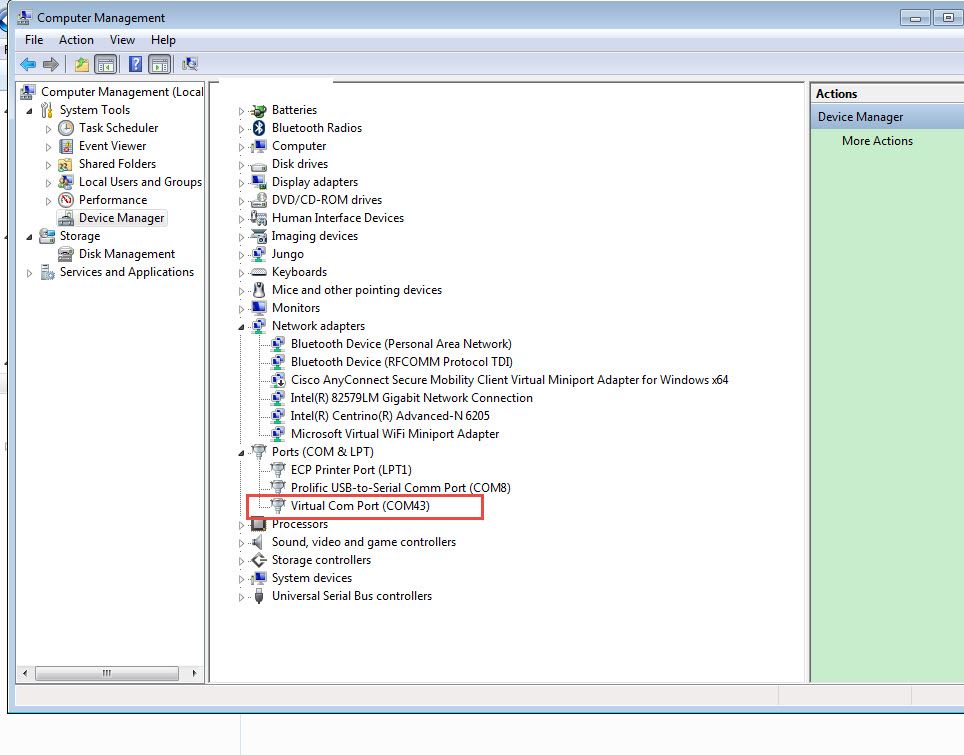
Please check the jumper in the three boards again, and download the code again.
Wish it helps you!
If you still have question, please let me know!
Have a great day,
Jingjing
-----------------------------------------------------------------------------------------------------------------------
Note: If this post answers your question, please click the Correct Answer button. Thank you!
-----------------------------------------------------------------------------------------------------------------------
Hi Jingjing Good day,
Yes, I have already done jumper configuration and checked twice.Now to make sure i checked it again with pdf that you have sent.But the problem still persists.I tried reinstalling IAR and PE micro drivers.Checked with other systems too.But result came out to be negative.Is there anything i have to do in additional.Thanks in advance.
Hi Sooryakrishnan,
Please try to uninstall your Driver, then unplug the usb, and plug it again, and try to install the correct driver again.
Besides, whether you install some protect software which will prevent the driver installing? You can try to disable your protect software and try again!
Jingjing
Hi Jingjing,
I guess there is no driver for usb that is why it is showing unknown device rt? So how am i supposed to uninstall the driver?Even after uninstalling simply,the device wont get installed it will again show "unknown device".Usually when we plug the device to usb port it shows "installing driver".Now these days it doesnt show any notifications.So what can be the real problem?Even now the UART example code which i used to run in the twr board (which i used to work as a stand alone board) doesnt work.
Hi Sooryakrishnan U,
Normally, this problem is caused by the computer OS, some customers install the simple or optimized windows version, this version may delete some useful windows driver.
Then it will can't find the COM driver.
I don't know whether your windows 7 version is the copyrighted software?
Jingjing
Hi Jingjing,
But it was working perfectly before!
Do you mean, you use the same driver and the same code, boards, it works ok before?
Now, even you just plug the J27 in the TWR-K53 board, it still can't find the COM port?
it seems some link file of windows be damaged.
Hi Jingjing,
Yes it worked with same board ,code and driver.Actually the example ekg demo code works with twr ser usb port.I used uart example with j27 usb and it also worked fine.Now both doesnt work eventhough the j37 usb shows the driver name!but wont get any output in terminal.If the problem is with the link file of windows how can i solve it?
Hi Sooryakrishnan
It is really difficult to find out the window's problem, and I am not the expert of the windows engineer.
A simple way is reinstall the computer.
Or you can try to use anther computer, and check whether the com port can be found!
Besides, I find some Chinese customers use this way, you can try it:
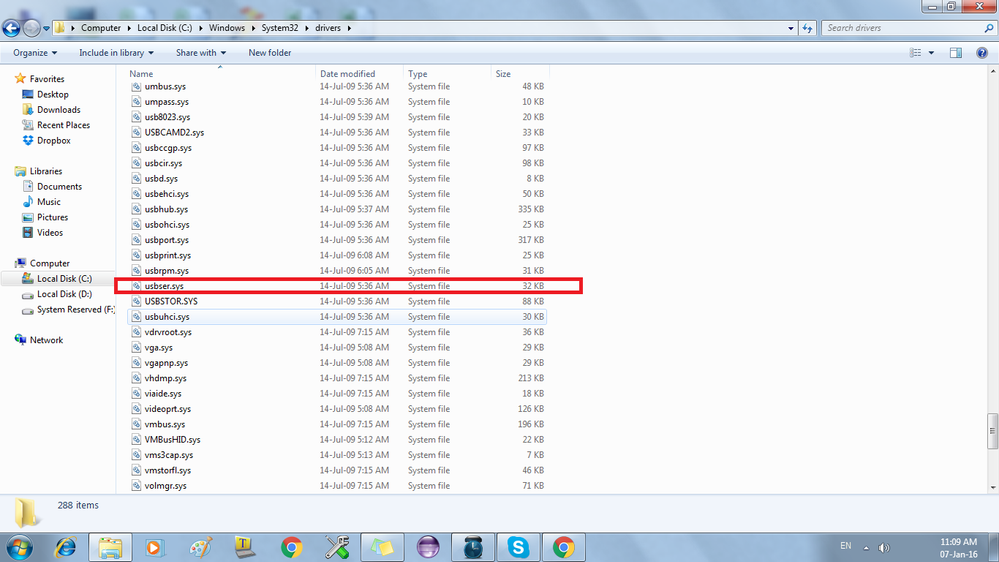
1: Check whether your file "usbser.sys " is lost in folder:C:\Windows\System32\drivers
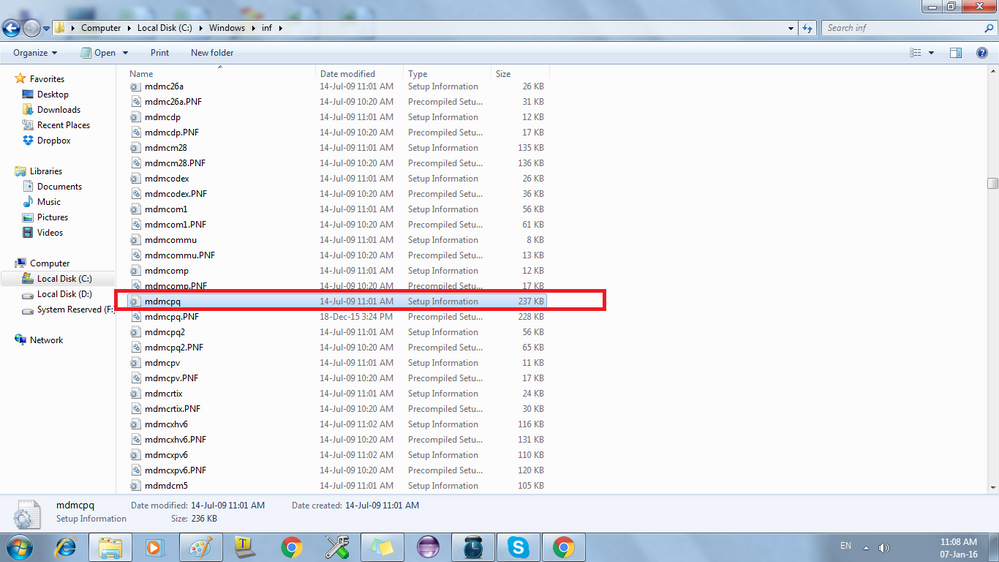
Check whether file"mdmcpq.inf" is lost in folder C:\Windows\inf
If lost these files, please find it from my attached zip file, unzip it, and copy "usbser.sys" to path C:\Windows\System32\drivers
copy "mdmcpq.inf" to path: C:\Windows\inf
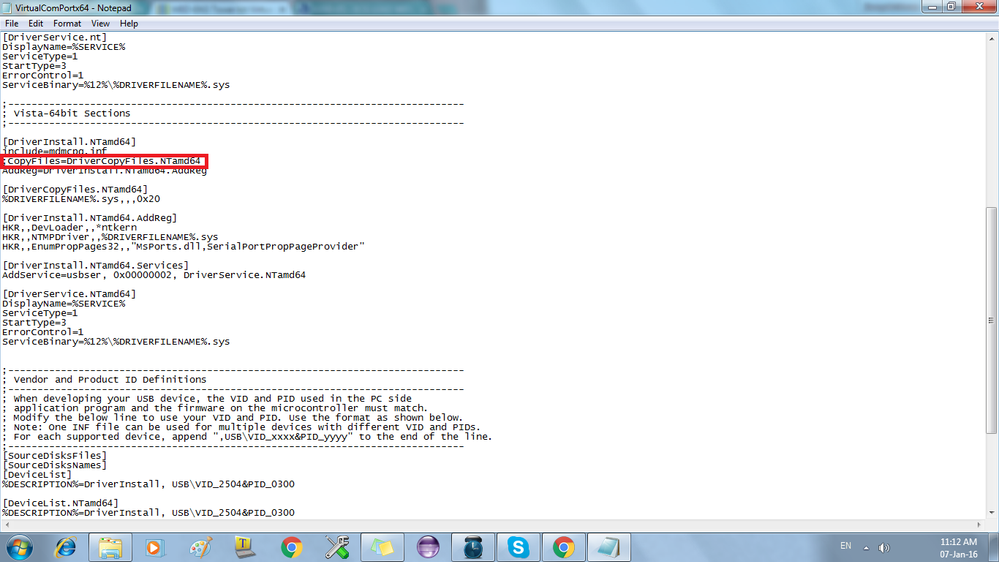
2: modify the info file in C:\Freescale\Medical GUI\Drivers\x64
comment :CopyFiles=DriverCopyFiles.NTamd64
just like the following:
;------------------------------------------------------------------------------
; Vista-64bit Sections
;------------------------------------------------------------------------------
[DriverInstall.NTamd64]
include=mdmcpq.inf
;CopyFiles=DriverCopyFiles.NTamd64
AddReg=DriverInstall.NTamd64.AddReg
[DriverCopyFiles.NTamd64]
%DRIVERFILENAME%.sys,,,0x20
[DriverInstall.NTamd64.AddReg]
HKR,,DevLoader,,*ntkern
HKR,,NTMPDriver,,%DRIVERFILENAME%.sys
HKR,,EnumPropPages32,,"MsPorts.dll,SerialPortPropPageProvider"
[DriverInstall.NTamd64.Services]
AddService=usbser, 0x00000002, DriverService.NTamd64
[DriverService.NTamd64]
DisplayName=%SERVICE%
ServiceType=1
StartType=3
ErrorControl=1
ServiceBinary=%12%\%DRIVERFILENAME%.sys
then save it, try to install the CDC driver, and select this driver file again.
Wish it helps you!
If you still have question, please let me know!
Have a great day,
Jingjing
-----------------------------------------------------------------------------------------------------------------------
Note: If this post answers your question, please click the Correct Answer button. Thank you!
-----------------------------------------------------------------------------------------------------------------------
Hi Good day Jingjing,
I have tried everything you said, I can find usbser.sys and mdmcpq.inf in their respected file locations.I tried commentingCopyFiles=DriverCopyFiles.NTamd64 this as well but no change when installing cdc driver still it shows 'unknown device".

Hi Jingjing zhou,
Have a nice day !
let me introduce myself as joice and i am a colleague of sooryakrishnan.
We have tried the twr system with 4 different windows 7 systems and i don't think its a driver issue.
an example code, hello world was worked well with uart0 but currently with same code it shows nothing. is there any possible chances of a hardware error/ fault ?
Best regards,
Joice Markose
Hi Joice Markose,
Welcome join the discussion!
If other computers all not OK, we really should check the hardware . Do you just have one board? If you have other board, you can try another board, then we can make sure it caused by the hardware, not the computer driver problem.
When you just connect the TWR-K53 board, and without the TWR-SER, can you find the OSBDM/OSJTAG COM port?
Just like the following picture:
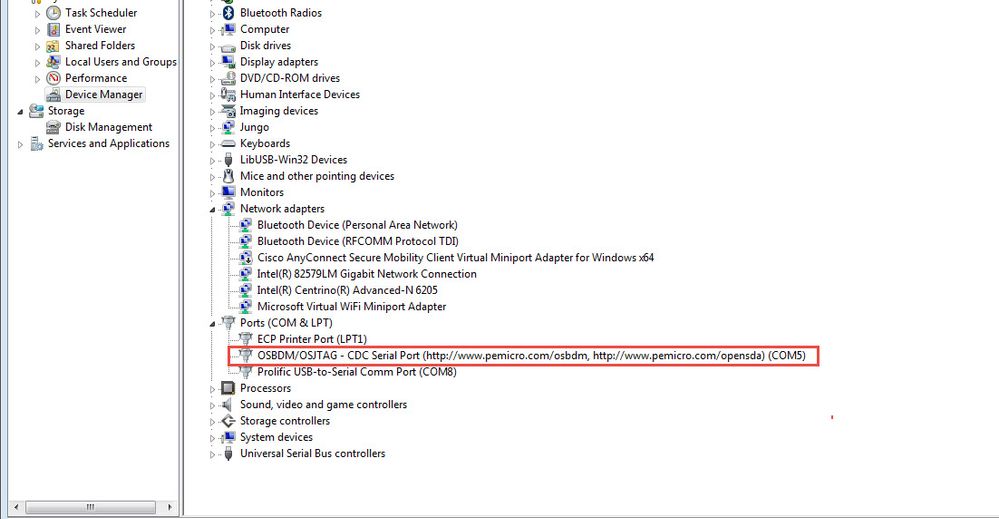

Or no COM appears, just can debug and download the code?
Waiting for your reply.
Jingjing
