
- Forums
- Product Forums
- General Purpose MicrocontrollersGeneral Purpose Microcontrollers
- i.MX Forumsi.MX Forums
- QorIQ Processing PlatformsQorIQ Processing Platforms
- Identification and SecurityIdentification and Security
- Power ManagementPower Management
- Wireless ConnectivityWireless Connectivity
- RFID / NFCRFID / NFC
- Advanced AnalogAdvanced Analog
- Neural Processing UnitsNeural Processing Units
- MCX Microcontrollers
- S32G
- S32K
- S32V
- MPC5xxx
- Other NXP Products
- S12 / MagniV Microcontrollers
- Powertrain and Electrification Analog Drivers
- Sensors
- Vybrid Processors
- Digital Signal Controllers
- 8-bit Microcontrollers
- ColdFire/68K Microcontrollers and Processors
- PowerQUICC Processors
- OSBDM and TBDML
- S32M
- S32Z/E
-
- Solution Forums
- Software Forums
- MCUXpresso Software and ToolsMCUXpresso Software and Tools
- CodeWarriorCodeWarrior
- MQX Software SolutionsMQX Software Solutions
- Model-Based Design Toolbox (MBDT)Model-Based Design Toolbox (MBDT)
- FreeMASTER
- eIQ Machine Learning Software
- Embedded Software and Tools Clinic
- S32 SDK
- S32 Design Studio
- GUI Guider
- Zephyr Project
- Voice Technology
- Application Software Packs
- Secure Provisioning SDK (SPSDK)
- Processor Expert Software
- Generative AI & LLMs
-
- Topics
- Mobile Robotics - Drones and RoversMobile Robotics - Drones and Rovers
- NXP Training ContentNXP Training Content
- University ProgramsUniversity Programs
- Rapid IoT
- NXP Designs
- SafeAssure-Community
- OSS Security & Maintenance
- Using Our Community
-
- Cloud Lab Forums
-
- Knowledge Bases
- ARM Microcontrollers
- i.MX Processors
- Identification and Security
- Model-Based Design Toolbox (MBDT)
- QorIQ Processing Platforms
- S32 Automotive Processing Platform
- Wireless Connectivity
- CodeWarrior
- MCUXpresso Suite of Software and Tools
- MQX Software Solutions
- RFID / NFC
- Advanced Analog
- Neural Processing Units
-
- NXP Tech Blogs
- Home
- :
- General Purpose Microcontrollers
- :
- Kinetis Microcontrollers
- :
- Re: I2C Accelerometer ISsues on FRDM-board
I2C Accelerometer ISsues on FRDM-board
- Subscribe to RSS Feed
- Mark Topic as New
- Mark Topic as Read
- Float this Topic for Current User
- Bookmark
- Subscribe
- Mute
- Printer Friendly Page
I2C Accelerometer ISsues on FRDM-board

- Mark as New
- Bookmark
- Subscribe
- Mute
- Subscribe to RSS Feed
- Permalink
- Report Inappropriate Content
Hello,
I am trying to make the on board inertial sensor and I2C to communicate and blink LEDS based on xyz directions as RGB on a FRDM-KE02Z40M board. I didnot have a driver for the on board inertial sensor MMA8451Q on the IDE KDSV3.0 and PE and so I used the driver code for the sensor from the source link below.
https://mcuoneclipse.com/2012/09/21/tutorial-accelerating-the-kl25z-freedom-board/
The errors that I am getting is with regard to the definition of the struct on the device driver. (screenshot attached)
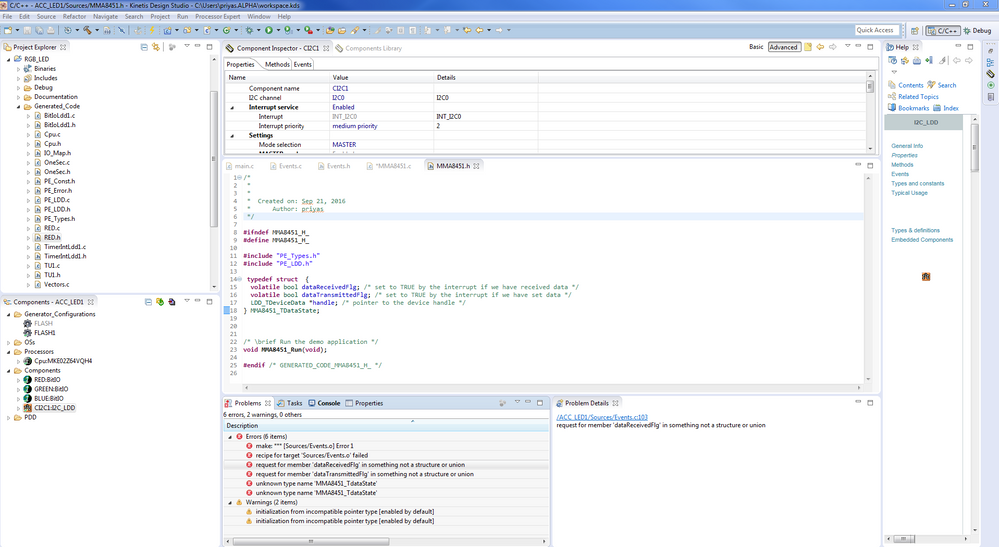
I am not sure why the object MMA8451_TDatastate is not being created or errors are thrown. Syntactically this looks okay to me. Any thoughts or suggestions are welcome. Thanks!
P.S.I have not used the GPIO_LDD component as mentioned in the link. I am not sure what its use case is.

 Robin_Shen
- Mark as New
- Bookmark
- Subscribe
- Mute
- Subscribe to RSS Feed
- Permalink
- Report Inappropriate Content
Hi SaiPriya,
The full project and source code is available from this link.
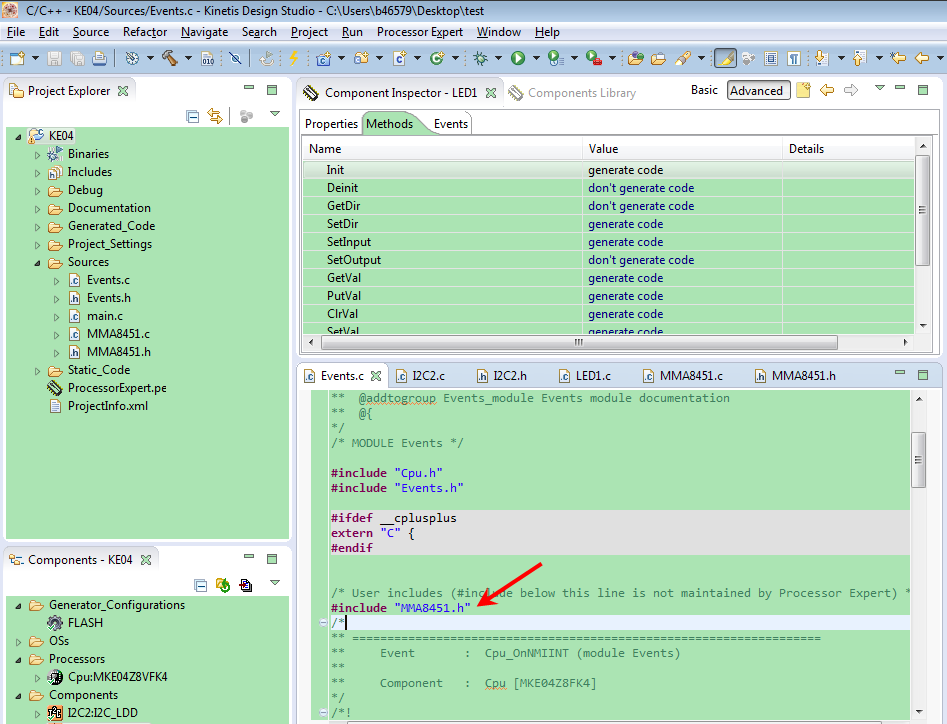
Have you include the "MMA8451.h" in Event.c?
Best Regards,
Robin

- Mark as New
- Bookmark
- Subscribe
- Mute
- Subscribe to RSS Feed
- Permalink
- Report Inappropriate Content
Hi
See:
- http://www.utasker.com/kinetis/FRDM-KE02Z.html
- http://www.utasker.com/kinetis/FRDM-KE02Z40M.html
There is a complete solution which samples the MMA8451Q and drives the LED color depending on its position. It can be simply modified to control LED blinking or other outputs as required.
Regards
Mark
Kinetis for professionals: http://www.utasker.com/kinetis.html
- Mark as New
- Bookmark
- Subscribe
- Mute
- Subscribe to RSS Feed
- Permalink
- Report Inappropriate Content
I am using Open SDA as my Debugger and PEComponets in KDS. Do you think I should change to uTasker now?
I have drivers for Accelerometer and Generic I2C installed in my Processor Expert Components (as Erich had uploaded on GitHub) . Now I have an error free code in KDS but there is only RED led on forever inspite of tilting the board. Any pointers to debug this issue would be helpful.
- Mark as New
- Bookmark
- Subscribe
- Mute
- Subscribe to RSS Feed
- Permalink
- Report Inappropriate Content
Hi
It is up to you. If you want to improve performance and development efficiency you can use the uTasker environment and also have an immediate solution to your present work.
It builds with KDS (or CW, or IAR, or Keil, Rowley, Atollic, CooCox, Green Hills, GCC, VS) and alows you to simulate to better debug and analyse Kinetis workings. It doesn't use PE since it has hand-crafted code for all of the functions that can be put together much faster than PE code generation, as well as allowing you to move between Kinetis parts without needing to generate new projects and port work that has already been done.
To check your board and the operation there is a binary at one of the links which you can load (quote):
ADC Sampling and LED color control using PWM based on Accelerometer Readings
This application has been configured with PWM support (SUPPORT_TIMER and SUPPORT_PWM_MODULE) with three PWM outputs connected to the three LEDs in the RGB LED (PWM_LED_CONTROL), which, together with the I2C based accelerometer operation, controls the intensity of the three LED colors in the RGB LED so that the LED's overall color depends on the orientation of the board.
ADC operation is enabled (SUPPORT_ADC) and with TEST_ADC enabled in ADC_Timers.h demonstrates regular sampling of the thermistor's positive terminal voltage, which is then displayed on the UART debug interface (115'200 Baud).
Since the LED is used by PWM outputs, the normal blinking green LED operation is not present.
uTaskerV1.4.011_FRDM-KE02Z40M_ADC_PWM_ACC.bin Stand-alone software that can be loaded using the FRDM-KE02Z40M's USB-MSD boot loader [25.9k].
Regards
Mark
PS: See this video (also valid for KDS) to see how easy it is to set up and build an application that uses the accelerometer to control a USB mouse: https://www.youtube.com/watch?v=uBbiw36Caq4&feature=youtu.be
Your processor doesn't have USB and that is why the LED color control is practical. Almost any Kinetis part can be used without any porting needed - just set 1..3 defines in the project code and 2 settings in whichever IDE you wish to use to achieve your first goal!
