
- Forums
- Product Forums
- General Purpose MicrocontrollersGeneral Purpose Microcontrollers
- i.MX Forumsi.MX Forums
- QorIQ Processing PlatformsQorIQ Processing Platforms
- Identification and SecurityIdentification and Security
- Power ManagementPower Management
- Wireless ConnectivityWireless Connectivity
- RFID / NFCRFID / NFC
- Advanced AnalogAdvanced Analog
- Neural Processing UnitsNeural Processing Units
- MCX Microcontrollers
- S32G
- S32K
- S32V
- MPC5xxx
- Other NXP Products
- S12 / MagniV Microcontrollers
- Powertrain and Electrification Analog Drivers
- Sensors
- Vybrid Processors
- Digital Signal Controllers
- 8-bit Microcontrollers
- ColdFire/68K Microcontrollers and Processors
- PowerQUICC Processors
- OSBDM and TBDML
- S32M
- S32Z/E
-
- Solution Forums
- Software Forums
- MCUXpresso Software and ToolsMCUXpresso Software and Tools
- CodeWarriorCodeWarrior
- MQX Software SolutionsMQX Software Solutions
- Model-Based Design Toolbox (MBDT)Model-Based Design Toolbox (MBDT)
- FreeMASTER
- eIQ Machine Learning Software
- Embedded Software and Tools Clinic
- S32 SDK
- S32 Design Studio
- GUI Guider
- Zephyr Project
- Voice Technology
- Application Software Packs
- Secure Provisioning SDK (SPSDK)
- Processor Expert Software
- Generative AI & LLMs
-
- Topics
- Mobile Robotics - Drones and RoversMobile Robotics - Drones and Rovers
- NXP Training ContentNXP Training Content
- University ProgramsUniversity Programs
- Rapid IoT
- NXP Designs
- SafeAssure-Community
- OSS Security & Maintenance
- Using Our Community
-
- Cloud Lab Forums
-
- Knowledge Bases
- ARM Microcontrollers
- i.MX Processors
- Identification and Security
- Model-Based Design Toolbox (MBDT)
- QorIQ Processing Platforms
- S32 Automotive Processing Platform
- Wireless Connectivity
- CodeWarrior
- MCUXpresso Suite of Software and Tools
- MQX Software Solutions
- RFID / NFC
- Advanced Analog
- Neural Processing Units
-
- NXP Tech Blogs
- Home
- :
- 通用微控制器
- :
- Kinetis微控制器
- :
- Fault Occurred When read Flash content on MK24FN1M0
Fault Occurred When read Flash content on MK24FN1M0

As stated in the title,hard fault occurred when i try to read flash content. i was used "memcpy" function.and i tried myself function too,like this:
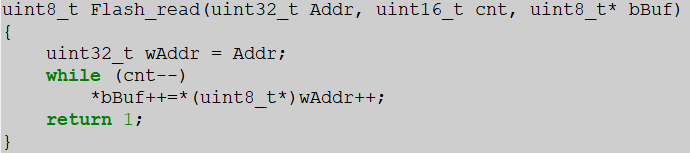
it was the same problem,when i used "Flash_read" function with parameter "Addr" was 0xFF000. but,it was no problem when parameter "Addr" was 0xFE000. i'd want to ask,whether this problem is caused by the security of flash sector?
thanks
已解决! 转到解答。

Hi
Try a mass erase of the Flash and repeat your test. If it works after this the problem was that you had programmed the Flash (usually using in application programming) but performed something incorrectly (eg. tried to write to a location twice without first performing a section erasure). Illegal operations can cause damage and some of the Kinetis parts (newer ones like K64, K24) will mark the area of Flash as corrupted and hard fault when reads are attempted to it. A erasure of the corrupted area (sector, but better still a mass erase) recovers this.
Regards
Mark
Kinetis: http://www.utasker.com/kinetis.html
Kinetis K21/K22/K24:
- http://www.utasker.com/kinetis/TWR-K21D50M.html
- http://www.utasker.com/kinetis/TWR-K21F120M.html
- http://www.utasker.com/kinetis/FRDM-K22F.html
- http://www.utasker.com/kinetis/TWR-K22F120M.html
- http://www.utasker.com/kinetis/BLAZE_K22.html
- http://www.utasker.com/kinetis/tinyK22.html
- http://www.utasker.com/kinetis/TWR-K24F120M.html
For less questions and restrictions, and faster, cheaper developments: try uTasker for Kinetis
Hi
Try a mass erase of the Flash and repeat your test. If it works after this the problem was that you had programmed the Flash (usually using in application programming) but performed something incorrectly (eg. tried to write to a location twice without first performing a section erasure). Illegal operations can cause damage and some of the Kinetis parts (newer ones like K64, K24) will mark the area of Flash as corrupted and hard fault when reads are attempted to it. A erasure of the corrupted area (sector, but better still a mass erase) recovers this.
Regards
Mark
Kinetis: http://www.utasker.com/kinetis.html
Kinetis K21/K22/K24:
- http://www.utasker.com/kinetis/TWR-K21D50M.html
- http://www.utasker.com/kinetis/TWR-K21F120M.html
- http://www.utasker.com/kinetis/FRDM-K22F.html
- http://www.utasker.com/kinetis/TWR-K22F120M.html
- http://www.utasker.com/kinetis/BLAZE_K22.html
- http://www.utasker.com/kinetis/tinyK22.html
- http://www.utasker.com/kinetis/TWR-K24F120M.html
For less questions and restrictions, and faster, cheaper developments: try uTasker for Kinetis
hi Mark Butcher
The corrupted area which base is 0xFF000,is recover when i tried sector erase. I did not try a mass erase. And,i tried to executed sector erase on a sector first,then write twice of that sector. The write command interface just return false when i write that sector on the second time instead of hard fault. so i can't reappear the problem.
Any other suggestions?
Thanks.
best regards

 jeremyzhou
Hi ruiye qin
The problem may be caused by access to the flash sector via the read function whose location resides in the same flash sector.
So I'd highly recommend you to map the read function to RAM area and give a try again.
Have a great day,
TIC
-----------------------------------------------------------------------------------------------------------------------
Note: If this post answers your question, please click the Correct Answer button. Thank you!
-----------------------------------------------------------------------------------------------------------------------
