
- Forums
- Product Forums
- General Purpose MicrocontrollersGeneral Purpose Microcontrollers
- i.MX Forumsi.MX Forums
- QorIQ Processing PlatformsQorIQ Processing Platforms
- Identification and SecurityIdentification and Security
- Power ManagementPower Management
- Wireless ConnectivityWireless Connectivity
- RFID / NFCRFID / NFC
- Advanced AnalogAdvanced Analog
- Neural Processing UnitsNeural Processing Units
- MCX Microcontrollers
- S32G
- S32K
- S32V
- MPC5xxx
- Other NXP Products
- S12 / MagniV Microcontrollers
- Powertrain and Electrification Analog Drivers
- Sensors
- Vybrid Processors
- Digital Signal Controllers
- 8-bit Microcontrollers
- ColdFire/68K Microcontrollers and Processors
- PowerQUICC Processors
- OSBDM and TBDML
- S32M
- S32Z/E
-
- Solution Forums
- Software Forums
- MCUXpresso Software and ToolsMCUXpresso Software and Tools
- CodeWarriorCodeWarrior
- MQX Software SolutionsMQX Software Solutions
- Model-Based Design Toolbox (MBDT)Model-Based Design Toolbox (MBDT)
- FreeMASTER
- eIQ Machine Learning Software
- Embedded Software and Tools Clinic
- S32 SDK
- S32 Design Studio
- GUI Guider
- Zephyr Project
- Voice Technology
- Application Software Packs
- Secure Provisioning SDK (SPSDK)
- Processor Expert Software
- Generative AI & LLMs
-
- Topics
- Mobile Robotics - Drones and RoversMobile Robotics - Drones and Rovers
- NXP Training ContentNXP Training Content
- University ProgramsUniversity Programs
- Rapid IoT
- NXP Designs
- SafeAssure-Community
- OSS Security & Maintenance
- Using Our Community
-
- Cloud Lab Forums
-
- Knowledge Bases
- ARM Microcontrollers
- i.MX Processors
- Identification and Security
- Model-Based Design Toolbox (MBDT)
- QorIQ Processing Platforms
- S32 Automotive Processing Platform
- Wireless Connectivity
- CodeWarrior
- MCUXpresso Suite of Software and Tools
- MQX Software Solutions
- RFID / NFC
- Advanced Analog
- Neural Processing Units
-
- NXP Tech Blogs
- Home
- :
- 通用微控制器
- :
- Kinetis微控制器
- :
- FRDM-KL03Z in KDS: Debug or Run in VLLS Mode?
FRDM-KL03Z in KDS: Debug or Run in VLLS Mode?

Hello,
I'm using KDS with the FRDM-KL03Z board.I am trying to test the VLLS modes and have read that debug does not work when in these modes. How then do I run my code? Is it sufficient to just be "running" (green arrow near red square in picture below) while in debug mode, or do I need to do something else like using a run configuration (white arrow inside green circle beside the debug button in picture below)? I have never used the run configurations and am not sure what they do. When I select the debug run, the code doesn't execute the sleep mode.
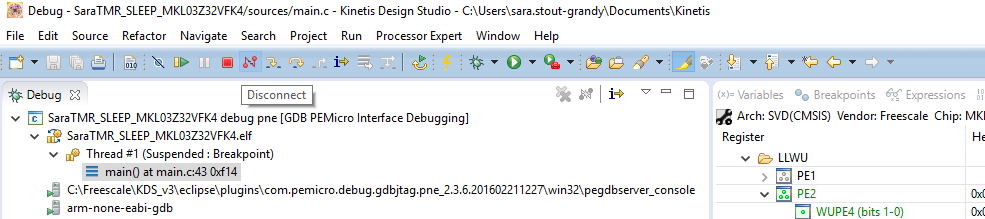
Any suggestions?
Thanks,
Sara
已解决! 转到解答。

Sara
SW2 is configured as a LLWU input and not a port interrupt. A port interrupt won't wake up from a low leakage mode since it is disabled - the pin can operate as a LLWU pin in this state but this is not related to the port interrupt in any way, and the port interrupt is never responsible for triggering a LLWU event.
There are no interrupts involved from VLLS0 since when the wake-up occurs it causes a HW Reset, which means that it will resume from the RESET vector and not from any while loop where it was put to sleep. It will or course resume in RUN mode after the reset. It is possible to know that the RESET was due to exit from VLLSx, rather than a normal one due to power up or reset pin, etc., by checking the reset cause. Depending on which VLLS mode used some parts of SRAM content may have been preserved.
If you need to resume at the location after the _wfi() you need to use a different low leakage mode (LLS rather than VLLSx) or a STOP based one (like VLPS).
Regards
Mark
Professional support for Kinetis: http://www.utasker.com/index.html
Remote desktop one-on-one coaching: http://www.utasker.com/services.html
Getting started to expert videos: https://www.youtube.com/results?search_query=utasker+shorts
Hi Mark,
Thanks for the clarification. I was obviously very confused and following an example that I found where it appeared that a port interrupt was being used in conjunction with the SW2 to trigger wake-up.
Follow-up questions:
1. So, to be clear, if I have enabled the SW2 pin as the LLWU wake-up source for VLLS0, then I don't need the LLWU interrupt enabled. If I understand your previous email, simply touching the SW2 should trigger the reset. Correct?
2. VLLS0 is the only mode that wakes up via a reset correct? The others would actually wakeup via an LLWU interrupt? I presume that SW2 would trigger than interrupt for these other modes?
Thanks again!
Sara
Sara
1. It is not necessary to enable a LLWU interrupt in the NVIC. It will wake from VLLS0 without an interrupt.
2. VLLS0, VLLS1 and VLLS3 always wake via a RESET. The others return to RUN mode (requiring an interrupt do so and not via LLWU).
Regards
Mark
Sara
Up to the point when the device goes to a LLS or VLLS mode the debugger can be used as normal.
Once the mode is set the debugger will stop working and usually will disconnect. In some cases KDS will also hang and a PC restart may be needed to get the debugger to operate again.
Therefore it is not worth using a debugger (nor work with different connection modes) to test such modes - just load the program to the board and disconnect the debugger, or reset the board manually so that it runs "stand-alone" as it would do in a final product anyway. Then check the VLLS operation 'live'.
Regards
Mark
P.S. I have attached a binary that allows all low power modes to run on the FRDM-KL03Z. To test "live" do the following:
1. Connect to its VCOM port at 19200 Baud.
2. Hit the enter key to get a menu.
3. Go to menu '4' - the Administrator menu.
4. command "show_lp" to see the present low power mode. Eg.
show_lp
0 = RUN
1 = WAIT [active]
2 = STOP
3 = PSTOP1
4 = PSTOP2
5 = VLPR
6 = VLPW
7 = VLPS
8 = VLLS0
9 = VLLS1
10 = VLLS3
5. Command VLLS0 mode with "set_lp 8"
6. The board will 'freeze' in this mode and consume about 2uA of current.
7. Press the button "SW2" to wake up via port LLWU event, which results in a reset (the only way to exit VLLS0). Or press the reset button.
Hi Mark,
Thanks, that was helpful.
Another question: I should be able to wake out of VLLS0 by touching the SW2 correct (assuming I have set up the IRQ handler properly)? I assume that the SW2 touch triggers the PORTB interrupt which then triggers the LLWU interrupt? After both interrupt routines are implemented then the code should resume in RUN mode. Does that mean it will resume in the while(1) loop where it left off, or will it act like a reset and start from the top of the main(void)?
Thanks,
Sara
Sara
SW2 is configured as a LLWU input and not a port interrupt. A port interrupt won't wake up from a low leakage mode since it is disabled - the pin can operate as a LLWU pin in this state but this is not related to the port interrupt in any way, and the port interrupt is never responsible for triggering a LLWU event.
There are no interrupts involved from VLLS0 since when the wake-up occurs it causes a HW Reset, which means that it will resume from the RESET vector and not from any while loop where it was put to sleep. It will or course resume in RUN mode after the reset. It is possible to know that the RESET was due to exit from VLLSx, rather than a normal one due to power up or reset pin, etc., by checking the reset cause. Depending on which VLLS mode used some parts of SRAM content may have been preserved.
If you need to resume at the location after the _wfi() you need to use a different low leakage mode (LLS rather than VLLSx) or a STOP based one (like VLPS).
Regards
Mark
Professional support for Kinetis: http://www.utasker.com/index.html
Remote desktop one-on-one coaching: http://www.utasker.com/services.html
Getting started to expert videos: https://www.youtube.com/results?search_query=utasker+shorts
