
- Forums
- Product Forums
- General Purpose MicrocontrollersGeneral Purpose Microcontrollers
- i.MX Forumsi.MX Forums
- QorIQ Processing PlatformsQorIQ Processing Platforms
- Identification and SecurityIdentification and Security
- Power ManagementPower Management
- Wireless ConnectivityWireless Connectivity
- RFID / NFCRFID / NFC
- Advanced AnalogAdvanced Analog
- Neural Processing UnitsNeural Processing Units
- MCX Microcontrollers
- S32G
- S32K
- S32V
- MPC5xxx
- Other NXP Products
- S12 / MagniV Microcontrollers
- Powertrain and Electrification Analog Drivers
- Sensors
- Vybrid Processors
- Digital Signal Controllers
- 8-bit Microcontrollers
- ColdFire/68K Microcontrollers and Processors
- PowerQUICC Processors
- OSBDM and TBDML
- S32M
- S32Z/E
-
- Solution Forums
- Software Forums
- MCUXpresso Software and ToolsMCUXpresso Software and Tools
- CodeWarriorCodeWarrior
- MQX Software SolutionsMQX Software Solutions
- Model-Based Design Toolbox (MBDT)Model-Based Design Toolbox (MBDT)
- FreeMASTER
- eIQ Machine Learning Software
- Embedded Software and Tools Clinic
- S32 SDK
- S32 Design Studio
- GUI Guider
- Zephyr Project
- Voice Technology
- Application Software Packs
- Secure Provisioning SDK (SPSDK)
- Processor Expert Software
- Generative AI & LLMs
-
- Topics
- Mobile Robotics - Drones and RoversMobile Robotics - Drones and Rovers
- NXP Training ContentNXP Training Content
- University ProgramsUniversity Programs
- Rapid IoT
- NXP Designs
- SafeAssure-Community
- OSS Security & Maintenance
- Using Our Community
-
- Cloud Lab Forums
-
- Knowledge Bases
- ARM Microcontrollers
- i.MX Processors
- Identification and Security
- Model-Based Design Toolbox (MBDT)
- QorIQ Processing Platforms
- S32 Automotive Processing Platform
- Wireless Connectivity
- CodeWarrior
- MCUXpresso Suite of Software and Tools
- MQX Software Solutions
- RFID / NFC
- Advanced Analog
- Neural Processing Units
-
- NXP Tech Blogs
- Home
- :
- 汎用マイクロコントローラ
- :
- Kinetisマイクロコントローラ
- :
- FRDM-KL03Z: Need Help to setup to use EXTAL as primary clock for LPTMR.
FRDM-KL03Z: Need Help to setup to use EXTAL as primary clock for LPTMR.
- RSS フィードを購読する
- トピックを新着としてマーク
- トピックを既読としてマーク
- このトピックを現在のユーザーにフロートします
- ブックマーク
- 購読
- ミュート
- 印刷用ページ

- 新着としてマーク
- ブックマーク
- 購読
- ミュート
- RSS フィードを購読する
- ハイライト
- 印刷
- 不適切なコンテンツを報告
Hello,
I'm trying to set-up my FRDM-KL03Z to run off the external 32kHz crystal in LPTMR mode. Below are my settings:
SIM_BWR_SCGC_BIT(SIM_BASE_PTR, kSimClockGateLptmr0, 1u);//Enables the LPTMR0 clock gate
SIM_BWR_SOPT1_OSC32KSEL(SIM_BASE_PTR,0b00); //Selects the 32 kHz clock source (ERCLK32K) for LPTMR
SIM_BWR_SOPT1_OSC32KOUT(SIM_BASE_PTR,0b01); //Set the clock ERCLK32K output on pin13
OSC_BWR_CR_ERCLKEN(OSC, 1); //Enables the external reference clock (OSCERCLK)
MCG_BWR_C1_CLKS(MCG, 0b10); //Selects external clock as the main clock source. This is EXT mode
MCG_BWR_C2_EREFS0(MCG, 0); //Selects the source for the external reference clock to be external clock.
This doesn't seem to work. What am I missing? I have read the OSC chapter and LPTMR and CLK chapters of the manual. I am very confused about how to get the EXTAL clock set. For that matter, I can't even seem to measure the external clock on the board itself to see that it is alive. Help!
Thanks,
Sara
解決済! 解決策の投稿を見る。

- 新着としてマーク
- ブックマーク
- 購読
- ミュート
- RSS フィードを購読する
- ハイライト
- 印刷
- 不適切なコンテンツを報告
Hi
I have attached the LPTMR module from the uTasker project as reference. Project configuration is LPTMR_CLOCK_EXTERNAL_32kHz, which is what you are going for I think. This is the part that will interest you:
POWER_UP(5, SIM_SCGC5_LPTIMER); // ensure that the timer can be accessed
LPTMR0_CSR = 0; // reset the timer and ensure no pending interrupts
LPTMR0_PSR = (LPTMR_PSR_PCS_ERCLK32K | LPTMR_PSR_PBYP); // clock from external 32kHz timer
That is all that should be needed.
It may be that you are confused by the option to clock from the OSCERCLK, which would be the option LPTMR_CLOCK_OSCERCLK.
This would then look like this:
POWER_UP(5, SIM_SCGC5_LPTIMER); // ensure that the timer can be accessed
LPTMR0_CSR = 0; // reset the timer and ensure no pending interrupts
OSC0_CR |= (OSC_CR_ERCLKEN | OSC_CR_EREFSTEN); // enable the external reference clock and keep it enabled in stop mode
LPTMR0_PSR = (LPTMR_PSR_PCS_OSC0ERCLK | (LPTMR_PRESCALE_VALUE << LPTMR_PSR_PRESCALE_SHIFT)); // program pre-scaler
To generate a periodic rate you then need to set LPTMR0_CMR with the period value
and enable with LPTMR0_CSR |= LPTMR_CSR_TEN;
I am not absolutely sure, but I have the feeling that you also want to run the processor directly from the 32kHz crystal. I have attached the MCG-Lite module too as reference. The code of interest is:
MCG_C2 = (MCG_C2_EREFS | MCG_C2_IRCS); // select oscillator as external clock source
OSC0_CR = (OSC_CR_ERCLKEN | OSC_CR_EREFSTEN); // enable the oscillator and allow it to continue oscillating in stop mode
SIM_CLKDIV1 = (((SYSTEM_CLOCK_DIVIDE - 1) << 28) | ((BUS_CLOCK_DIVIDE - 1) << 16)); // prepare bus clock divides
while ((MCG_S & MCG_S_OSCINIT0) == 0) {} // wait for the oscillator to start
MCG_C1 = MCG_C1_CLKS_EXTERN_CLK; // select external clock source
while ((MCG_S & MCG_S_CLKST_MASK) != MCG_S_CLKST_EXT) {} // wait until the source is selected
This is the default configuration if other clock sources are not specified. Note that debuggers tend to have difficulty working with such a slow clock rate; either run without the debugger or else try to set the debugger's clock speed as low as possible.
I understand that you are not interested in the uTasker project but it may still be worthwhile using it as reference since it allows you to set up things like this with one or two defines and test in its KL03 simulator so that you can then anaylse its operation and transfer the code to correct your configuration or the difficulties with your environment. You can probably save a huge amount of time in the long run.
To show you how simple and powerful it is in comparison to to your present solution I also attached a short video (1:25) showing how I can build a KL03 project according to your requirements and verify it in its KL03 simulator. All code can be analysed in the emulator, including interrupts and peripheral behavior in order to avoid lengthy trial and error on the HW.
Regards
Mark
- 新着としてマーク
- ブックマーク
- 購読
- ミュート
- RSS フィードを購読する
- ハイライト
- 印刷
- 不適切なコンテンツを報告
Hi Mark,
I finally got the LPTMR working off the external 32kHz Crystal on the FRDM-KL03Z board! In order to make it work, I had to set the following two bits in the OSC_CR register:
OSC_BWR_CR_ERCLKEN(OSC, 1); //Enables the external reference clock (OSCERCLK)
OSC_BWR_CR_EREFSTEN(OSC, 1); //Enables the external reference clock (OSCERCLK)
I'm quite confused as to why I had to do this. I was trying to get the ERCLK32K to work and now I'm not sure which clock is running. A couple questions:
1. Any ideas how I can tell which clock is running?
2. Why did I need to set these bits to get the external crystal to come alive?
Thanks!
Sara
- 新着としてマーク
- ブックマーク
- 購読
- ミュート
- RSS フィードを購読する
- ハイライト
- 印刷
- 不適切なコンテンツを報告
Hi
Some devices allow clocks to be connected to a CLK_OUT pin. Otherwise it is sometimes possible to verify indirectly by using something that relies on a particular clock signal and see what happens when it is disabled.
I don't know why you need to enable the STOP mode operation to get it to work - this should only define whether it continues running in STOP modes or not...
Regards
Mark
- 新着としてマーク
- ブックマーク
- 購読
- ミュート
- RSS フィードを購読する
- ハイライト
- 印刷
- 不適切なコンテンツを報告
Thanks Mark. I appreciate the fast replies!
Sara
- 新着としてマーク
- ブックマーク
- 購読
- ミュート
- RSS フィードを購読する
- ハイライト
- 印刷
- 不適切なコンテンツを報告
Hi Mark,
Ok. So...if I was to attach an external crystal that was not 32kHz, then the OSCERCLK will be the clock that I want to drive the LPTMR? What happens to the OSC32KCLK in that case?
Thanks,
Sara
- 新着としてマーク
- ブックマーク
- 購読
- ミュート
- RSS フィードを購読する
- ハイライト
- 印刷
- 不適切なコンテンツを報告
Sara
If you don't use a 32kHz crystal the OSC32KCLK "doesn't exist" - there is more info here: http://www.utasker.com/kinetis/KL_RTC.html
This also reference back to a discussion here when I was doing my original work back in 2014 -https://community.nxp.com/message/398196#398196
Possibly you will want to use OSCERCLK in that case or one of the other possible sources.
Regards
Mark
- 新着としてマーク
- ブックマーク
- 購読
- ミュート
- RSS フィードを購読する
- ハイライト
- 印刷
- 不適切なコンテンツを報告
Hi Mark,
Thanks for the quick response!
To clarify, I want to run the LPTMR off the external 32kHz crystal that is installed on the FRDM-KL03Z evaluation board, so I think you are correct with your first assumption. I understand that the crystal is connected to the EXTAL and XTAL pins on the KL03. According to the diagram on page 56 of the KL03 user’s manual (Chp.5 Clock distribution), it looks to me like both the OSCERCLK and the ERCLK32K can both be derived from the EXTAL. Correct? I should therefore be able to run either one into the LTPMR, correct? What is the primary difference between the two?
Thanks,
Sara
- 新着としてマーク
- ブックマーク
- 購読
- ミュート
- RSS フィードを購読する
- ハイライト
- 印刷
- 不適切なコンテンツを報告
Sara
I think that this is the diagram of interest for the LPTMR:
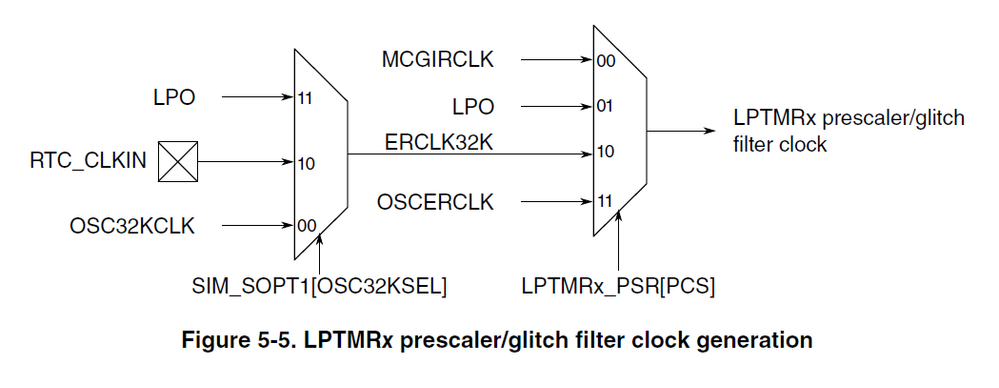
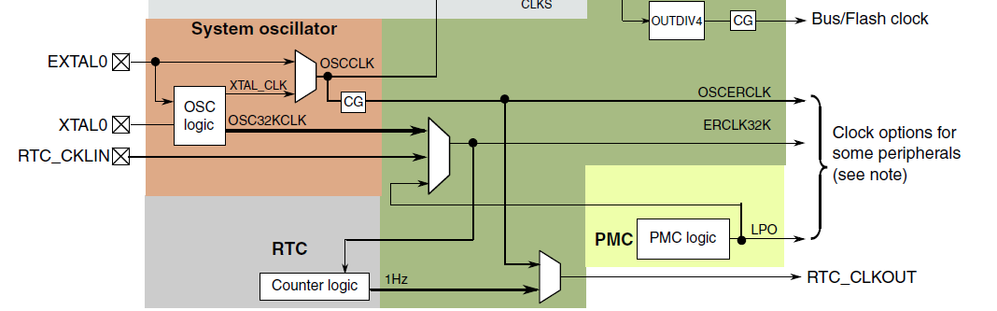
In your case it is true that the two possible sources are in fact the same. The signal OSC32KCLK is only present when a 32kHz crystal is used and not when a higher frequency one is delivering the XTAL_CLK.
Regards
Mark
- 新着としてマーク
- ブックマーク
- 購読
- ミュート
- RSS フィードを購読する
- ハイライト
- 印刷
- 不適切なコンテンツを報告
Hi
I have attached the LPTMR module from the uTasker project as reference. Project configuration is LPTMR_CLOCK_EXTERNAL_32kHz, which is what you are going for I think. This is the part that will interest you:
POWER_UP(5, SIM_SCGC5_LPTIMER); // ensure that the timer can be accessed
LPTMR0_CSR = 0; // reset the timer and ensure no pending interrupts
LPTMR0_PSR = (LPTMR_PSR_PCS_ERCLK32K | LPTMR_PSR_PBYP); // clock from external 32kHz timer
That is all that should be needed.
It may be that you are confused by the option to clock from the OSCERCLK, which would be the option LPTMR_CLOCK_OSCERCLK.
This would then look like this:
POWER_UP(5, SIM_SCGC5_LPTIMER); // ensure that the timer can be accessed
LPTMR0_CSR = 0; // reset the timer and ensure no pending interrupts
OSC0_CR |= (OSC_CR_ERCLKEN | OSC_CR_EREFSTEN); // enable the external reference clock and keep it enabled in stop mode
LPTMR0_PSR = (LPTMR_PSR_PCS_OSC0ERCLK | (LPTMR_PRESCALE_VALUE << LPTMR_PSR_PRESCALE_SHIFT)); // program pre-scaler
To generate a periodic rate you then need to set LPTMR0_CMR with the period value
and enable with LPTMR0_CSR |= LPTMR_CSR_TEN;
I am not absolutely sure, but I have the feeling that you also want to run the processor directly from the 32kHz crystal. I have attached the MCG-Lite module too as reference. The code of interest is:
MCG_C2 = (MCG_C2_EREFS | MCG_C2_IRCS); // select oscillator as external clock source
OSC0_CR = (OSC_CR_ERCLKEN | OSC_CR_EREFSTEN); // enable the oscillator and allow it to continue oscillating in stop mode
SIM_CLKDIV1 = (((SYSTEM_CLOCK_DIVIDE - 1) << 28) | ((BUS_CLOCK_DIVIDE - 1) << 16)); // prepare bus clock divides
while ((MCG_S & MCG_S_OSCINIT0) == 0) {} // wait for the oscillator to start
MCG_C1 = MCG_C1_CLKS_EXTERN_CLK; // select external clock source
while ((MCG_S & MCG_S_CLKST_MASK) != MCG_S_CLKST_EXT) {} // wait until the source is selected
This is the default configuration if other clock sources are not specified. Note that debuggers tend to have difficulty working with such a slow clock rate; either run without the debugger or else try to set the debugger's clock speed as low as possible.
I understand that you are not interested in the uTasker project but it may still be worthwhile using it as reference since it allows you to set up things like this with one or two defines and test in its KL03 simulator so that you can then anaylse its operation and transfer the code to correct your configuration or the difficulties with your environment. You can probably save a huge amount of time in the long run.
To show you how simple and powerful it is in comparison to to your present solution I also attached a short video (1:25) showing how I can build a KL03 project according to your requirements and verify it in its KL03 simulator. All code can be analysed in the emulator, including interrupts and peripheral behavior in order to avoid lengthy trial and error on the HW.
Regards
Mark
