
- Forums
- Product Forums
- General Purpose MicrocontrollersGeneral Purpose Microcontrollers
- i.MX Forumsi.MX Forums
- QorIQ Processing PlatformsQorIQ Processing Platforms
- Identification and SecurityIdentification and Security
- Power ManagementPower Management
- Wireless ConnectivityWireless Connectivity
- RFID / NFCRFID / NFC
- Advanced AnalogAdvanced Analog
- Neural Processing UnitsNeural Processing Units
- MCX Microcontrollers
- S32G
- S32K
- S32V
- MPC5xxx
- Other NXP Products
- S12 / MagniV Microcontrollers
- Powertrain and Electrification Analog Drivers
- Sensors
- Vybrid Processors
- Digital Signal Controllers
- 8-bit Microcontrollers
- ColdFire/68K Microcontrollers and Processors
- PowerQUICC Processors
- OSBDM and TBDML
- S32M
- S32Z/E
-
- Solution Forums
- Software Forums
- MCUXpresso Software and ToolsMCUXpresso Software and Tools
- CodeWarriorCodeWarrior
- MQX Software SolutionsMQX Software Solutions
- Model-Based Design Toolbox (MBDT)Model-Based Design Toolbox (MBDT)
- FreeMASTER
- eIQ Machine Learning Software
- Embedded Software and Tools Clinic
- S32 SDK
- S32 Design Studio
- GUI Guider
- Zephyr Project
- Voice Technology
- Application Software Packs
- Secure Provisioning SDK (SPSDK)
- Processor Expert Software
- Generative AI & LLMs
-
- Topics
- Mobile Robotics - Drones and RoversMobile Robotics - Drones and Rovers
- NXP Training ContentNXP Training Content
- University ProgramsUniversity Programs
- Rapid IoT
- NXP Designs
- SafeAssure-Community
- OSS Security & Maintenance
- Using Our Community
-
- Cloud Lab Forums
-
- Knowledge Bases
- ARM Microcontrollers
- i.MX Processors
- Identification and Security
- Model-Based Design Toolbox (MBDT)
- QorIQ Processing Platforms
- S32 Automotive Processing Platform
- Wireless Connectivity
- CodeWarrior
- MCUXpresso Suite of Software and Tools
- MQX Software Solutions
- RFID / NFC
- Advanced Analog
- Neural Processing Units
-
- NXP Tech Blogs
- Home
- :
- 汎用マイクロコントローラ
- :
- Kinetisマイクロコントローラ
- :
- Can't enable security on MKL17Z256VLH4.
Can't enable security on MKL17Z256VLH4.
- RSS フィードを購読する
- トピックを新着としてマーク
- トピックを既読としてマーク
- このトピックを現在のユーザーにフロートします
- ブックマーク
- 購読
- ミュート
- 印刷用ページ

- 新着としてマーク
- ブックマーク
- 購読
- ミュート
- RSS フィードを購読する
- ハイライト
- 印刷
- 不適切なコンテンツを報告
Hi!
I am using Kinetis Design Studio, with KSDK_1.3.0, debugger - Segger Base. Project uses only basic HAL - i.e. register references only, no Processor Expert and no other drivers. Finally, when firmware was ready, I wanted to secure it, but get
in a trouble.
So I modified startup_MKL17Z4.S flash configuration:
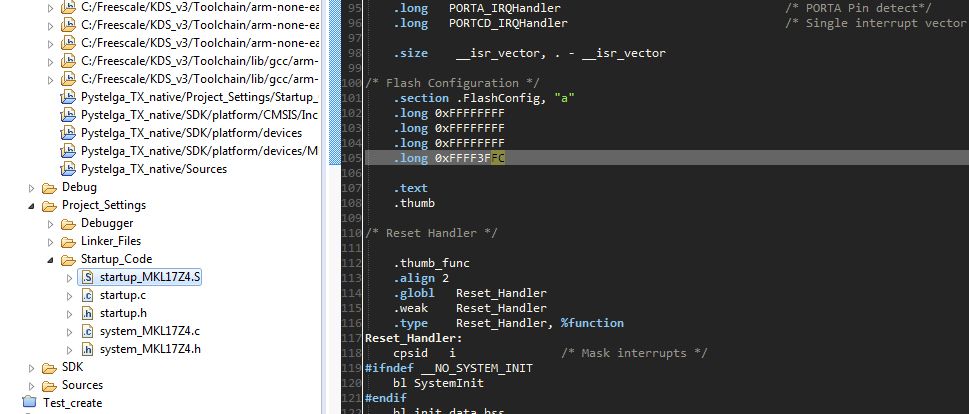
Ending was default: FE - 0xFE (Backdoor key access disabled, Mass erase is enabled, NXP factory access granted, MCU security status is unsecure). So just want to set SEC b00 - MCU security status is secure.
So got this:
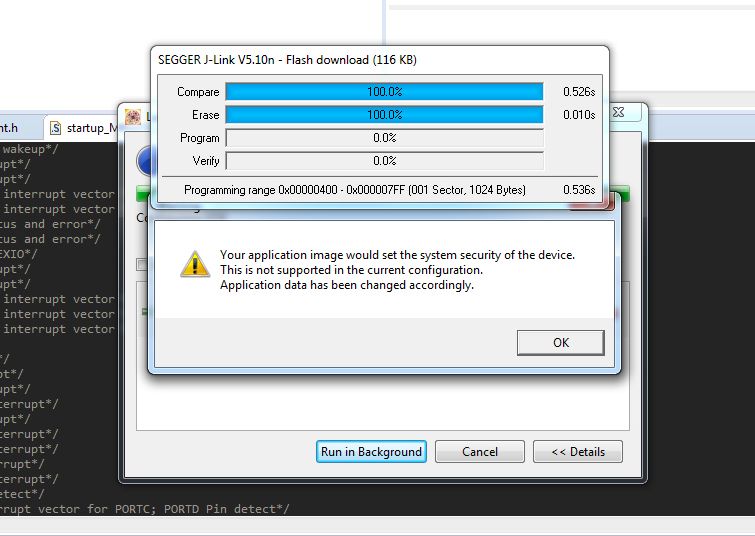
I loocked over here and found about two similar posts, and answer seems to be clear.
We are developing code for about a year, and through all this time I used to upload firmware through debug mode,
so simply catched my own tail: I wanted to lock MCU and start debug.
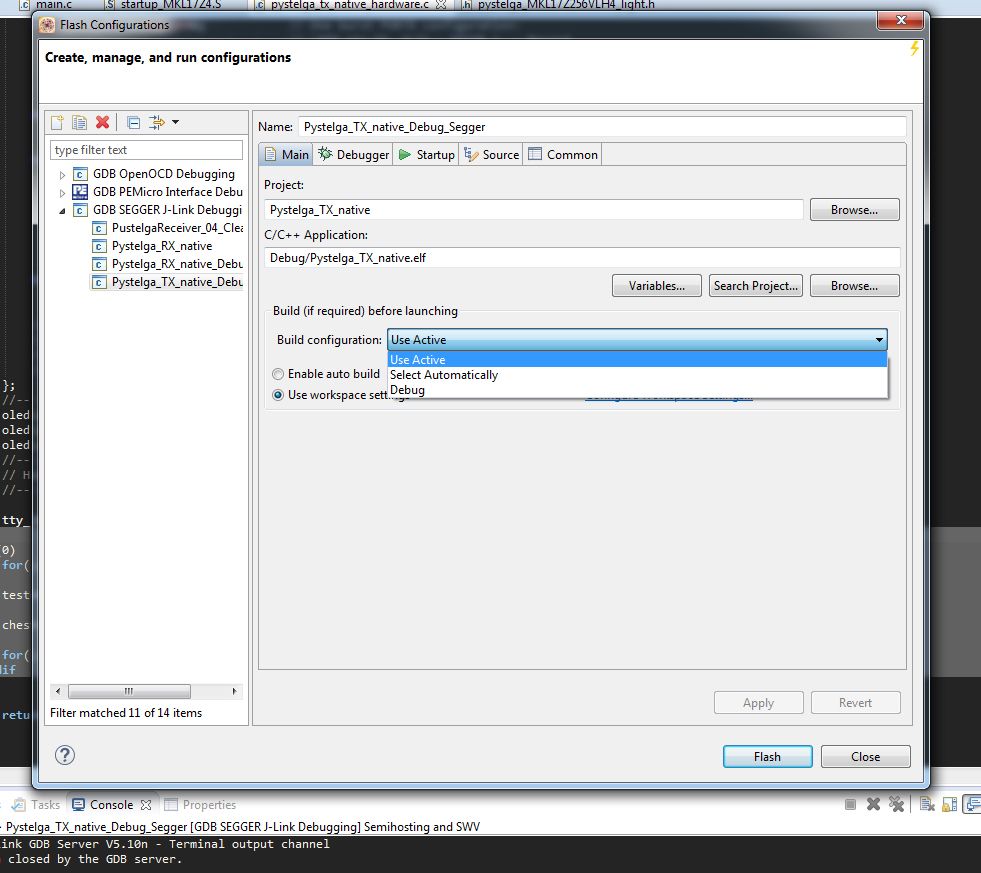
So I opened Flash from File and ....confused, this is the same as debug template, and certainly, result is the same.
I tried different combinations of FSLACC-SEC then: in some combination(don't remember exact) alert disappeared.
Then I added some code to check FTFA_FSEC register, just print it to PC terminal over RS-232 (wires connection available on our device housing), certainly, no security state again. FTFA_FSEC [1:0] is always b10.
I am new at Kinetis MCU-s, so really sorry... please explain me step by step how to upload secure firmware.
What is exactly to be done: .... crate new target.... etc.
解決済! 解決策の投稿を見る。
- 新着としてマーク
- ブックマーク
- 購読
- ミュート
- RSS フィードを購読する
- ハイライト
- 印刷
- 不適切なコンテンツを報告
Hi, Alice!
Thank you for a detailed reply, I think it will help other people.
I have no PEmicro debugger, it's only about $150, but my local shipping is 3 weeks(
But I solved the problem:
I thought of generating a binary file and found this post:
How to convert .elf files to .Sxx or .Bin files
Grate thanks to ZhangJennie for his video!
1) In "native" project properties->C/C++ Build->Settings->Toolchains(tab)
Enable flash image generation and apply.
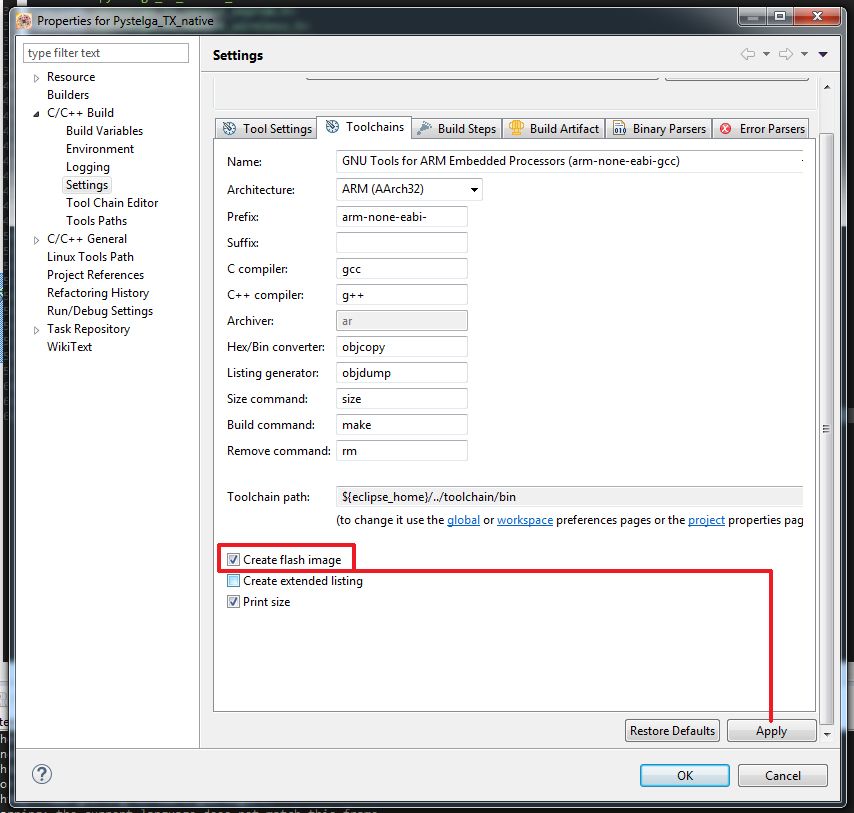
2) In previous tab (Note! SDK different from video)
Enable hex and Berkley(default for me) format, apply.
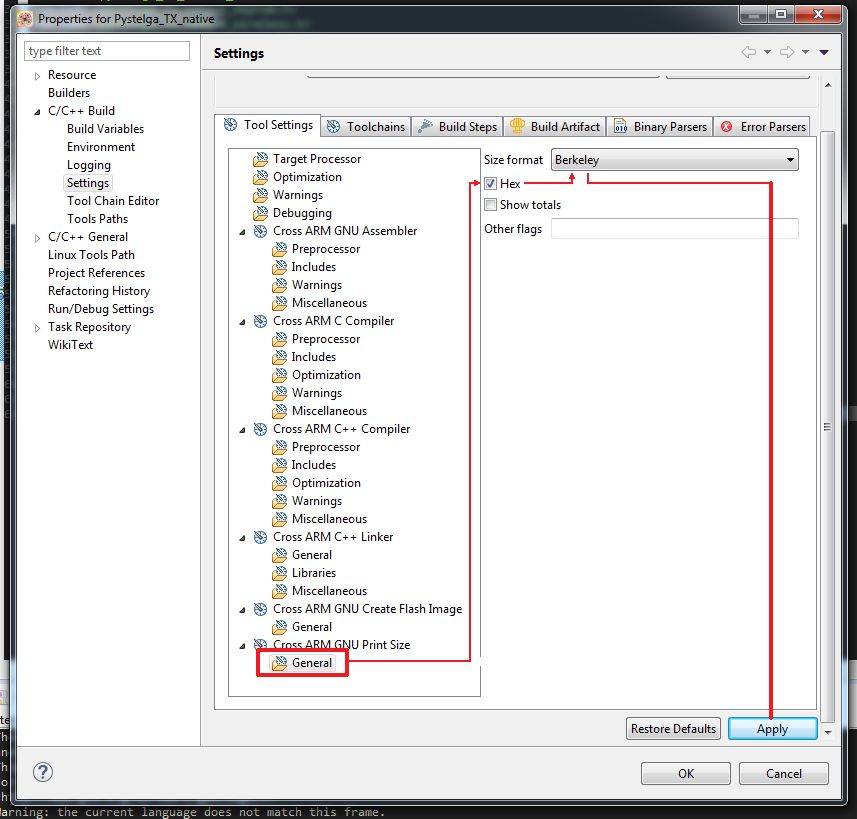
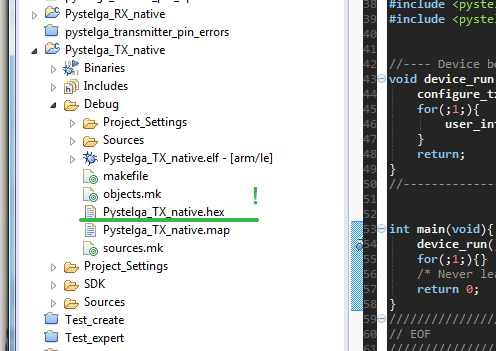
3) Then simply Build or Debug.
If debug, the alert will appear again but anyway .hex will be generated properly.
So here is our .hex now.
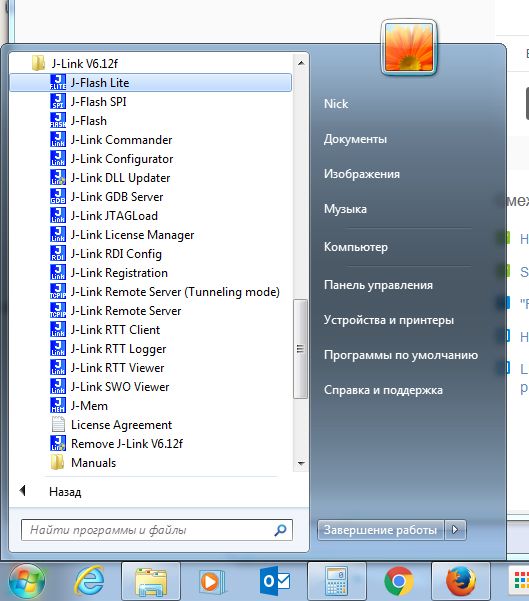
4) Open J-Flash lite utility:
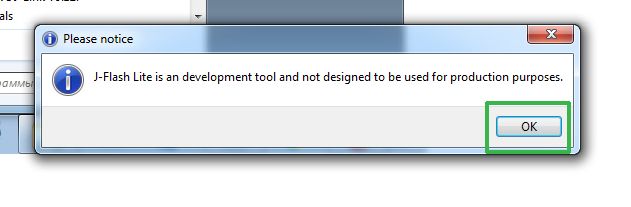
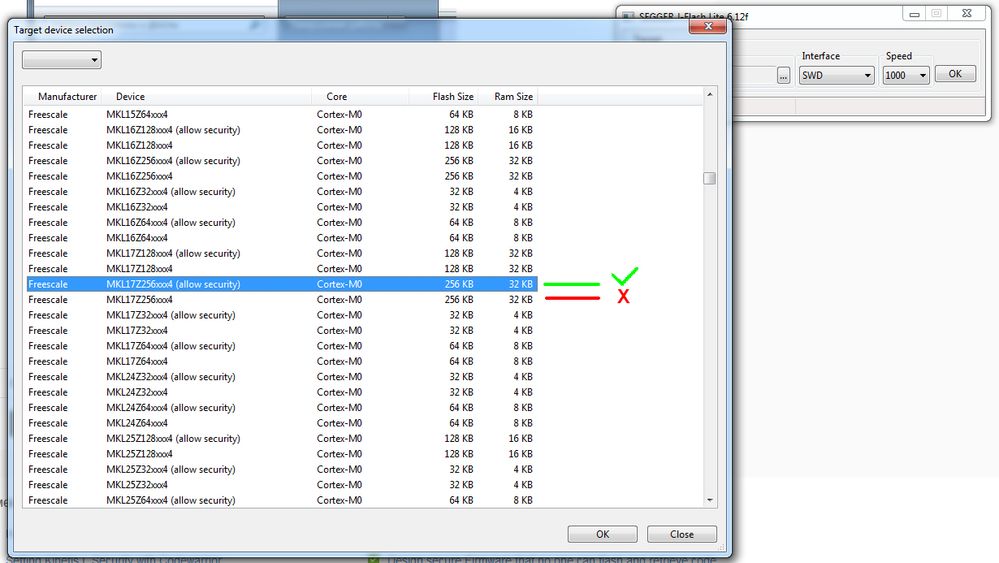
4) Select our target device (Important, certainly - allow security)
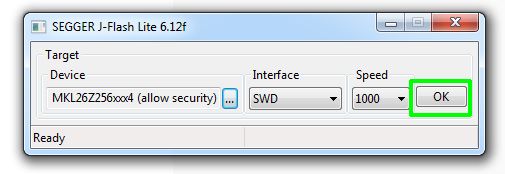
5) Then again OK:
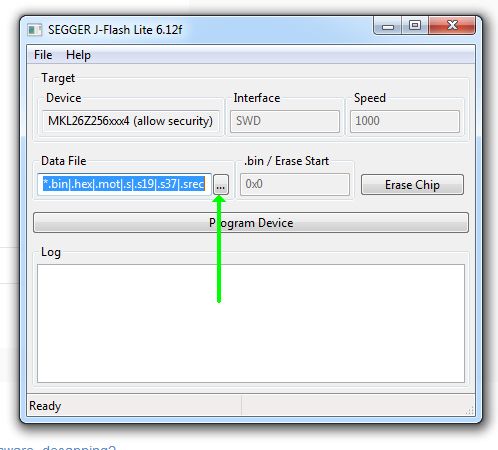
6) Next window - select our .hex file.
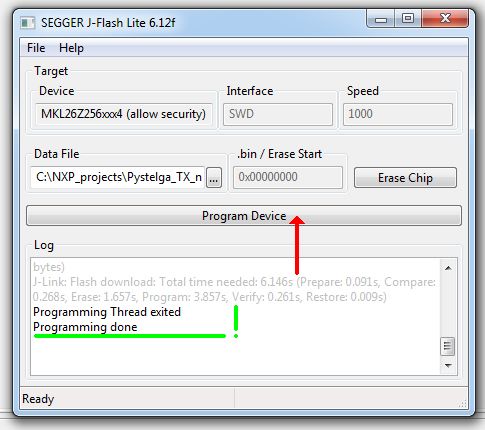
7) Program device.
So now FTFA_FSEC regiser replies:

FTFA_FSEC [1:0] - 00 first secured optional from (b00, b01, b11) - as ordered.
I repeated flash program and got the prove:
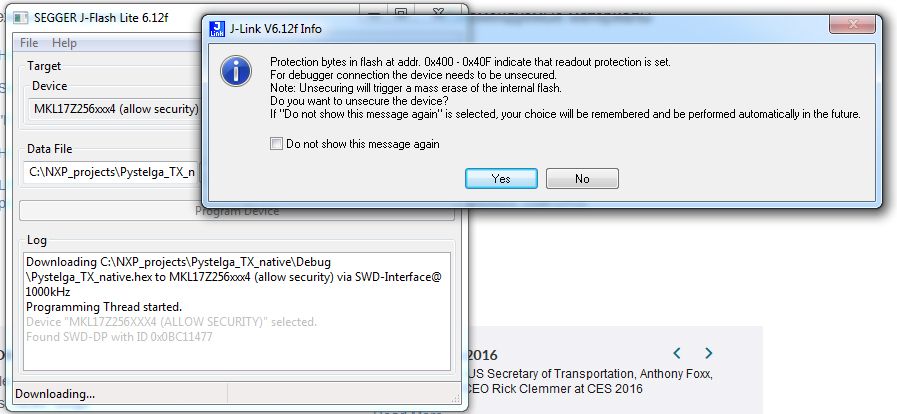
I Think now all is really OK.
PS: After Mass Erase and reprogram previously secure device, unit was hanging.
Just reboot in this case, firmware is actual and security enabled. Terminal replies - true.

 Alice_Yang
- 新着としてマーク
- ブックマーク
- 購読
- ミュート
- RSS フィードを購読する
- ハイライト
- 印刷
- 不適切なコンテンツを報告
Hello Nikolay,
Could you use the P&E debug , I test on KDSv3.0 with P&E debug , it can flash the code with enable security .
The steps as below :
- Create a new project on KDS based on your chip, for example named Project1, build.
-Click the Flash button
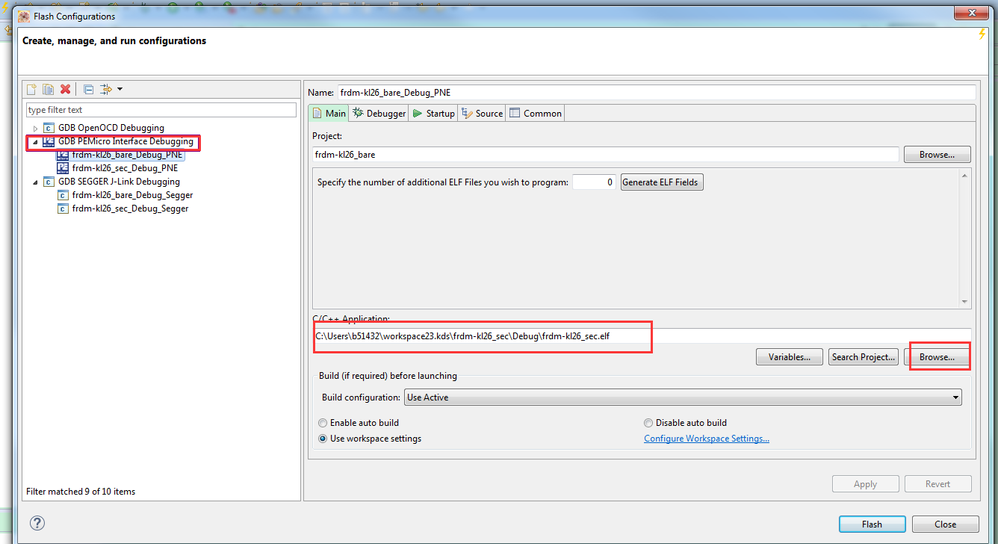
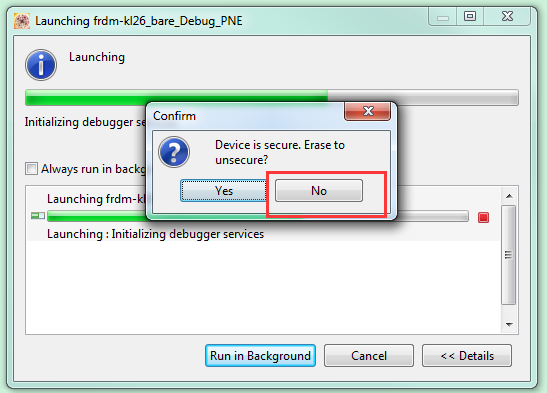
- Click "No" when it shows up the below at two times :
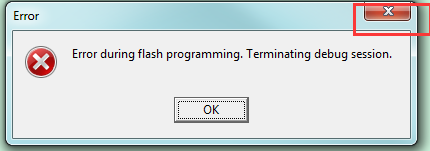
- Then if it shows up the below , please choose the close icon :
- Waiting for the debugger crash, re-power your board, it can run well with security, you can use the UART sending
FTFA_FSEC data to teminal .

Hope it helps
Have a great day,
TIC
-----------------------------------------------------------------------------------------------------------------------
Note: If this post answers your question, please click the Correct Answer button. Thank you!
-----------------------------------------------------------------------------------------------------------------------
- 新着としてマーク
- ブックマーク
- 購読
- ミュート
- RSS フィードを購読する
- ハイライト
- 印刷
- 不適切なコンテンツを報告
Hi, Alice!
Thank you for a detailed reply, I think it will help other people.
I have no PEmicro debugger, it's only about $150, but my local shipping is 3 weeks(
But I solved the problem:
I thought of generating a binary file and found this post:
How to convert .elf files to .Sxx or .Bin files
Grate thanks to ZhangJennie for his video!
1) In "native" project properties->C/C++ Build->Settings->Toolchains(tab)
Enable flash image generation and apply.
2) In previous tab (Note! SDK different from video)
Enable hex and Berkley(default for me) format, apply.
3) Then simply Build or Debug.
If debug, the alert will appear again but anyway .hex will be generated properly.
So here is our .hex now.
4) Open J-Flash lite utility:
4) Select our target device (Important, certainly - allow security)
5) Then again OK:
6) Next window - select our .hex file.
7) Program device.
So now FTFA_FSEC regiser replies:
FTFA_FSEC [1:0] - 00 first secured optional from (b00, b01, b11) - as ordered.
I repeated flash program and got the prove:
I Think now all is really OK.
PS: After Mass Erase and reprogram previously secure device, unit was hanging.
Just reboot in this case, firmware is actual and security enabled. Terminal replies - true.
