
- Forums
- Product Forums
- General Purpose MicrocontrollersGeneral Purpose Microcontrollers
- i.MX Forumsi.MX Forums
- QorIQ Processing PlatformsQorIQ Processing Platforms
- Identification and SecurityIdentification and Security
- Power ManagementPower Management
- Wireless ConnectivityWireless Connectivity
- RFID / NFCRFID / NFC
- Advanced AnalogAdvanced Analog
- Neural Processing UnitsNeural Processing Units
- MCX Microcontrollers
- S32G
- S32K
- S32V
- MPC5xxx
- Other NXP Products
- S12 / MagniV Microcontrollers
- Powertrain and Electrification Analog Drivers
- Sensors
- Vybrid Processors
- Digital Signal Controllers
- 8-bit Microcontrollers
- ColdFire/68K Microcontrollers and Processors
- PowerQUICC Processors
- OSBDM and TBDML
- S32M
- S32Z/E
-
- Solution Forums
- Software Forums
- MCUXpresso Software and ToolsMCUXpresso Software and Tools
- CodeWarriorCodeWarrior
- MQX Software SolutionsMQX Software Solutions
- Model-Based Design Toolbox (MBDT)Model-Based Design Toolbox (MBDT)
- FreeMASTER
- eIQ Machine Learning Software
- Embedded Software and Tools Clinic
- S32 SDK
- S32 Design Studio
- GUI Guider
- Zephyr Project
- Voice Technology
- Application Software Packs
- Secure Provisioning SDK (SPSDK)
- Processor Expert Software
- Generative AI & LLMs
-
- Topics
- Mobile Robotics - Drones and RoversMobile Robotics - Drones and Rovers
- NXP Training ContentNXP Training Content
- University ProgramsUniversity Programs
- Rapid IoT
- NXP Designs
- SafeAssure-Community
- OSS Security & Maintenance
- Using Our Community
-
- Cloud Lab Forums
-
- Knowledge Bases
- ARM Microcontrollers
- i.MX Processors
- Identification and Security
- Model-Based Design Toolbox (MBDT)
- QorIQ Processing Platforms
- S32 Automotive Processing Platform
- Wireless Connectivity
- CodeWarrior
- MCUXpresso Suite of Software and Tools
- MQX Software Solutions
- RFID / NFC
- Advanced Analog
- Neural Processing Units
-
- NXP Tech Blogs
- Home
- :
- MCUXpresso Software and Tools
- :
- Kinetis Design Studio
- :
- Re: SysTick now CRAWLING - K22F
SysTick now CRAWLING - K22F
- Subscribe to RSS Feed
- Mark Topic as New
- Mark Topic as Read
- Float this Topic for Current User
- Bookmark
- Subscribe
- Mute
- Printer Friendly Page
SysTick now CRAWLING - K22F

- Mark as New
- Bookmark
- Subscribe
- Mute
- Subscribe to RSS Feed
- Permalink
- Report Inappropriate Content
So I have an OSA instance of FreeRTOS ticking off the SysTick at 100 Hz. That normally works just fine, but every now and then the RTOS related process appear to come to a stop. When I capture what is happening, the SysTick appears to be firing once every 2-3 seconds or so, rather than at 100 Hz.
I thought it might have something to do with interrupts being disabled or some such, but other interrupts run just fine.
I don't even know where to being looking at this. EmbSysReg doesn't include SysTick and the Registers in the debug window don't either.
Any suggestions on where to start would be greatly appreciated.
Regards,
Tharon
- Mark as New
- Bookmark
- Subscribe
- Mute
- Subscribe to RSS Feed
- Permalink
- Report Inappropriate Content
So I am sure there is a good chance it has something to do with threading on our OSA implementation using FreeRTOS. Any thoughts on where to re-post the question or possibly a good place to start? Have discovered that debugging RTOS issues is particularly tricky, as most folks could attest to I am sure.

 trytohelp
- Mark as New
- Bookmark
- Subscribe
- Mute
- Subscribe to RSS Feed
- Permalink
- Report Inappropriate Content
Hi,
May be you can create a new post for this problem.
Have a great day,
Pascal
Freescale Technical Support
-----------------------------------------------------------------------------------------------------------------------
Note: If this post answers your question, please click the Correct Answer button. Thank you!
-----------------------------------------------------------------------------------------------------------------------
- Mark as New
- Bookmark
- Subscribe
- Mute
- Subscribe to RSS Feed
- Permalink
- Report Inappropriate Content
Well, still haven't found the source of this particular issue. It does appear that under normal conditions the SysTick works correctly, and was not able to discern any issues specifically with the SysTick when my idle tasks suspended with no known cause. Might be yet another RTOS-related issue that manifests itself in some very nasty ways I am afraid. :smileysad:
- Mark as New
- Bookmark
- Subscribe
- Mute
- Subscribe to RSS Feed
- Permalink
- Report Inappropriate Content
A related question: As a possible workaround, could I manually call FreeRTOS's tick from a working interrupt? Does anyone know how to manipulate the SysTick? I couldn't find anything in PEx, but wasn't 100% sure where to look.
 marek_neuzil
- Mark as New
- Bookmark
- Subscribe
- Mute
- Subscribe to RSS Feed
- Permalink
- Report Inappropriate Content
Hello,
You can use the EmbSys Registers window to see the content of all registers. You just must select the target device manually.
Open the EmbSys Registers window and open the Preferences dialog, see below:
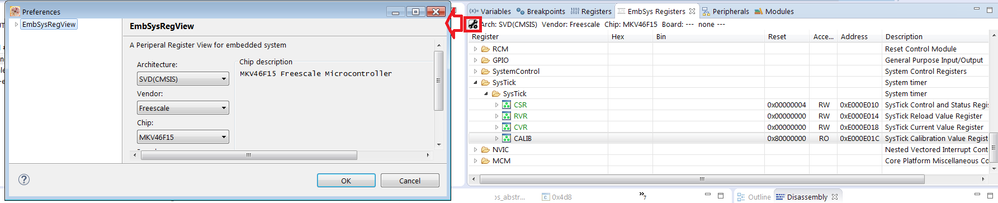
In the dialog select the SVD(CMSIS) architecture, Freescale vendor and the target chip. Click on OK.
All registers will be displayed. You just must select registers which value you want to update (double click on the register). If the content is not updated execute a single instruction by a debugger to refresh the content of the selected registers.
Please note, that you can have a bug in the application (content of registers is overwritten by using uninitialized pointer), heap or stack size issue (memory is overwritten) and so on.
Best Regards,
Marek Neuzil
- Mark as New
- Bookmark
- Subscribe
- Mute
- Subscribe to RSS Feed
- Permalink
- Report Inappropriate Content
Thanks, but I fear it is simply missing from my view of my K22F MCU. :smileysad: Perhaps some kind soul knows how to update the definition file to include it?
marek_neuzil
- Mark as New
- Bookmark
- Subscribe
- Mute
- Subscribe to RSS Feed
- Permalink
- Report Inappropriate Content
Hello,
I have checked all MK22F derivatives in EmbSys Registers window (KDS 3.0.0 installation) and all these derivatives contain SysTick registers.
If you are not using KDS 3.0.0 you can try to update EmbSys Registers SVD files, see the detailed description on the webpage Updated Eclipse EmbSysReg Viewer with extra Freescale SVD Files | MCU on Eclipse
Best Regards,
Marek Neuzil
- Mark as New
- Bookmark
- Subscribe
- Mute
- Subscribe to RSS Feed
- Permalink
- Report Inappropriate Content
Yeah! There is an even better file for my device now and with the update I can see SysTick. Now the question is whether or not I can fix my issue, though the good news is I am better prepared to debug it. :smileyhappy:
