
- Forums
- Product Forums
- General Purpose MicrocontrollersGeneral Purpose Microcontrollers
- i.MX Forumsi.MX Forums
- QorIQ Processing PlatformsQorIQ Processing Platforms
- Identification and SecurityIdentification and Security
- Power ManagementPower Management
- Wireless ConnectivityWireless Connectivity
- RFID / NFCRFID / NFC
- Advanced AnalogAdvanced Analog
- MCX Microcontrollers
- S32G
- S32K
- S32V
- MPC5xxx
- Other NXP Products
- S12 / MagniV Microcontrollers
- Powertrain and Electrification Analog Drivers
- Sensors
- Vybrid Processors
- Digital Signal Controllers
- 8-bit Microcontrollers
- ColdFire/68K Microcontrollers and Processors
- PowerQUICC Processors
- OSBDM and TBDML
- S32M
- S32Z/E
-
- Solution Forums
- Software Forums
- MCUXpresso Software and ToolsMCUXpresso Software and Tools
- CodeWarriorCodeWarrior
- MQX Software SolutionsMQX Software Solutions
- Model-Based Design Toolbox (MBDT)Model-Based Design Toolbox (MBDT)
- FreeMASTER
- eIQ Machine Learning Software
- Embedded Software and Tools Clinic
- S32 SDK
- S32 Design Studio
- GUI Guider
- Zephyr Project
- Voice Technology
- Application Software Packs
- Secure Provisioning SDK (SPSDK)
- Processor Expert Software
- Generative AI & LLMs
-
- Topics
- Mobile Robotics - Drones and RoversMobile Robotics - Drones and Rovers
- NXP Training ContentNXP Training Content
- University ProgramsUniversity Programs
- Rapid IoT
- NXP Designs
- SafeAssure-Community
- OSS Security & Maintenance
- Using Our Community
-
- Cloud Lab Forums
-
- Knowledge Bases
- ARM Microcontrollers
- i.MX Processors
- Identification and Security
- Model-Based Design Toolbox (MBDT)
- QorIQ Processing Platforms
- S32 Automotive Processing Platform
- Wireless Connectivity
- CodeWarrior
- MCUXpresso Suite of Software and Tools
- MQX Software Solutions
- RFID / NFC
- Advanced Analog
-
- NXP Tech Blogs
- Home
- :
- ソフトウェア・フォーラム
- :
- GUIガイダー
- :
- Re: in guiGuider,I'm getting an error message. when I try to run simulator, run target or generate
in guiGuider,I'm getting an error message. when I try to run simulator, run target or generate code
- RSS フィードを購読する
- トピックを新着としてマーク
- トピックを既読としてマーク
- このトピックを現在のユーザーにフロートします
- ブックマーク
- 購読
- ミュート
- 印刷用ページ

- 新着としてマーク
- ブックマーク
- 購読
- ミュート
- RSS フィードを購読する
- ハイライト
- 印刷
- 不適切なコンテンツを報告
i am getting the following error when trying to generatecode, run simulator,or run target
Error: opening registry key 'Software\Avast\Java Runtime Environment' Error: could not find java.ll Error: Could not find Java SE Runtime Environment.

解決済! 解決策の投稿を見る。
- 新着としてマーク
- ブックマーク
- 購読
- ミュート
- RSS フィードを購読する
- ハイライト
- 印刷
- 不適切なコンテンツを報告
Thank you LiubinGong,
That was exactly it. The JRE was missing and I only had the JDK installed. I should have read the GuiGuider User Guide... I am no longer getting the following error:
Error: opening registry key 'Software\Avast\Java Runtime Environment' Error: could not find java.ll Error: Could not find Java SE Runtime Environment.
What I did was
1) uninstall the 2 versions of the JDK as I wanted a fresh install.
2) downloaded a new JRE from Oracle from this page Java SE Runtime Environment 8 - Downloads - Oracle
I download the follow version.
Windows x64 | 80.7 MB | jre-8u291-windows-x64.exe |
And installed it. The install only installs the JRE because I don't need the JDK at the moment.
3) I then added path "C:\Program Files\Java\jre1.8.0_291\bin" to the PATH System environment Variable.
4) to test the installation from a command I ran the following java command , and it displayed the current version.

Thanks
Steve K
 LiubinGong
- 新着としてマーク
- ブックマーク
- 購読
- ミュート
- RSS フィードを購読する
- ハイライト
- 印刷
- 不適切なコンテンツを報告
Can you check the Java installed or Java env settings? and if you feel uncertain about the install Prerequisites. please click "Help -> User Guider" to open the GUI Guider doc and check them.
- 新着としてマーク
- ブックマーク
- 購読
- ミュート
- RSS フィードを購読する
- ハイライト
- 印刷
- 不適切なコンテンツを報告
HI thanks for responding, I'm just seeing this now.
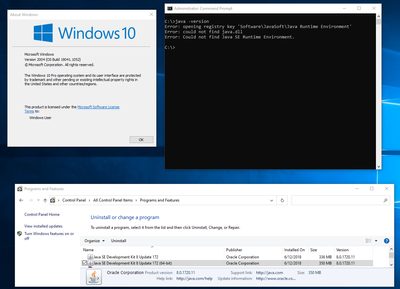
Not real sure how to check on my java installation, but I did some peeking around and found that some install must have installed the Java SE development Kit 8? (see attached pics below)
I never purposefully installed it and don't know how to use it. I'm running Windows 10 (see pics below for current version).. And interestingly enough if I type in the command "java -version" and I get the same error.(See Pics)
I'm lost for a solution at this point? Do I uninstall and reinstall a new version of the JAVA SE? does an environment variable need to set to point the the installation? do you know of hand what quiGuider supports?
Any direction that you could send me too, would be greatly appreciated.
zhenhualuo
- 新着としてマーク
- ブックマーク
- 購読
- ミュート
- RSS フィードを購読する
- ハイライト
- 印刷
- 不適切なコンテンツを報告
Hi skruglewicz,
You can download JRE from https://www.java.com/en/download/manual.jsp and install it on your PC, then follow below steps to configure environment variable.
a. Open Control Panel and search env.
b. Choose "Edit the system environment variables"
c. Click the "Environment Variables…" button.
d. Under the System Variables section (the bottom half), select "Path" variable and click "Edit" to open the Edit UI.
e. Click New and type in the java path. For example, C:\Program Files (x86)\Common Files\Oracle\Java\javapath.
f. Click OK to save your change.
After above changes, please try again.
LiubinGong
- 新着としてマーク
- ブックマーク
- 購読
- ミュート
- RSS フィードを購読する
- ハイライト
- 印刷
- 不適切なコンテンツを報告
from your pics, I guess that your host pc missed JRE(Java Runtime Environment), only installed JDK(Java Development Kit).
You can uninstall this JDK, and reinstall the full Java environment. The appropriate version can be obtained from GUI Guider doc.
- 新着としてマーク
- ブックマーク
- 購読
- ミュート
- RSS フィードを購読する
- ハイライト
- 印刷
- 不適切なコンテンツを報告
Thank you LiubinGong,
That was exactly it. The JRE was missing and I only had the JDK installed. I should have read the GuiGuider User Guide... I am no longer getting the following error:
Error: opening registry key 'Software\Avast\Java Runtime Environment' Error: could not find java.ll Error: Could not find Java SE Runtime Environment.
What I did was
1) uninstall the 2 versions of the JDK as I wanted a fresh install.
2) downloaded a new JRE from Oracle from this page Java SE Runtime Environment 8 - Downloads - Oracle
I download the follow version.
Windows x64 | 80.7 MB | jre-8u291-windows-x64.exe |
And installed it. The install only installs the JRE because I don't need the JDK at the moment.
3) I then added path "C:\Program Files\Java\jre1.8.0_291\bin" to the PATH System environment Variable.
4) to test the installation from a command I ran the following java command , and it displayed the current version.
Thanks
Steve K
