
- Forums
- Product Forums
- General Purpose MicrocontrollersGeneral Purpose Microcontrollers
- i.MX Forumsi.MX Forums
- QorIQ Processing PlatformsQorIQ Processing Platforms
- Identification and SecurityIdentification and Security
- Power ManagementPower Management
- Wireless ConnectivityWireless Connectivity
- RFID / NFCRFID / NFC
- Advanced AnalogAdvanced Analog
- Neural Processing UnitsNeural Processing Units
- MCX Microcontrollers
- S32G
- S32K
- S32V
- MPC5xxx
- Other NXP Products
- S12 / MagniV Microcontrollers
- Powertrain and Electrification Analog Drivers
- Sensors
- Vybrid Processors
- Digital Signal Controllers
- 8-bit Microcontrollers
- ColdFire/68K Microcontrollers and Processors
- PowerQUICC Processors
- OSBDM and TBDML
- S32M
- S32Z/E
-
- Solution Forums
- Software Forums
- MCUXpresso Software and ToolsMCUXpresso Software and Tools
- CodeWarriorCodeWarrior
- MQX Software SolutionsMQX Software Solutions
- Model-Based Design Toolbox (MBDT)Model-Based Design Toolbox (MBDT)
- FreeMASTER
- eIQ Machine Learning Software
- Embedded Software and Tools Clinic
- S32 SDK
- S32 Design Studio
- GUI Guider
- Zephyr Project
- Voice Technology
- Application Software Packs
- Secure Provisioning SDK (SPSDK)
- Processor Expert Software
- Generative AI & LLMs
-
- Topics
- Mobile Robotics - Drones and RoversMobile Robotics - Drones and Rovers
- NXP Training ContentNXP Training Content
- University ProgramsUniversity Programs
- Rapid IoT
- NXP Designs
- SafeAssure-Community
- OSS Security & Maintenance
- Using Our Community
-
- Cloud Lab Forums
-
- Knowledge Bases
- ARM Microcontrollers
- i.MX Processors
- Identification and Security
- Model-Based Design Toolbox (MBDT)
- QorIQ Processing Platforms
- S32 Automotive Processing Platform
- Wireless Connectivity
- CodeWarrior
- MCUXpresso Suite of Software and Tools
- MQX Software Solutions
- RFID / NFC
- Advanced Analog
- Neural Processing Units
-
- NXP Tech Blogs
- Home
- :
- Software Forums
- :
- FreeMASTER
- :
- MagniV MCAT data Type Question 2
MagniV MCAT data Type Question 2
- Subscribe to RSS Feed
- Mark Topic as New
- Mark Topic as Read
- Float this Topic for Current User
- Bookmark
- Subscribe
- Mute
- Printer Friendly Page

- Mark as New
- Bookmark
- Subscribe
- Mute
- Subscribe to RSS Feed
- Permalink
- Report Inappropriate Content
Hi..
Please contact us for a more detailed answer.
Re: MagniV MCAT data Type Question - NXP Community
I don't understand the answer in the link above.
Please explain in an easy way.
Solved! Go to Solution.

 MichalH
- Mark as New
- Bookmark
- Subscribe
- Mute
- Subscribe to RSS Feed
- Permalink
- Report Inappropriate Content
No,
I was giving just an example using a signed integer short variable. In your/MCAT case, the input X value is of a Q-fract type which is a value betwen -1 and 1. This will generate real-world value between -Nmax to Nmax. I think there are two facts that might be confusing:
- The fractional format itself needs to be understood. The fractional Q(0,15) variable can hold values between -1 and 1. It is still a 16 bit variable (not float), so if you look at the raw value, you will see values -32768 to 32767, but this is just a physical representation. You need to understand that the number is always in the <-1,1) range.
- So, in the MCAT setting, a value X=1000 maps to value 1000*Nmax, this means that value X=1 maps to Y=Nmax which was the goal. The X2=1000 is maybe confusing because the X actually never goes up to 1000 (it only goes up to to 1), but still the formula is correct because also the Y2 is multiplied by 1000.
You could also set the [X2,Y2] to [500, Nmax*500] or [10, Nmax*10] or [1, Nmax] and the effect would be the same (try it). I think the MCAT guys did use the [1000, Nmax*1000] due to some historic or experimental reasons. But still I think it is a correct setting.
Regards,
Michal
MichalH
- Mark as New
- Bookmark
- Subscribe
- Mute
- Subscribe to RSS Feed
- Permalink
- Report Inappropriate Content
Dear @SW_Park ,
if I understand correctly your question posted to the other thread, you need more information about how the "Linear Transformation" of variable value works in FreeMASTER.
It is actually quite simple. The goal of the transformation is to re-calculate a value obtained from target MCU application to physical real-world units.
For example, if there is an integer variable in the MCU application which goes from 0 to 32767 while it represents a rotation speed in range of 0..3000 rpms. In this case it very convenient to use the "Linear two points" transformation which convert an X-axis value to Y-axis value according to a simple linear graph. There are two known points [0,0] and [32767,3000] in the graph as displayed below:
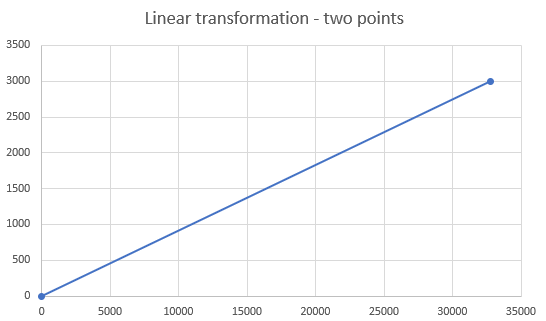
So, with this settings, the FreeMASTER will use a value read from MCU and puts it to X axis of the graph and re-calculates it to corresponding Y-axis value.
The other way of recalculation is using a standard linear equation Y=a*X+b, where the variable value is used as X and the result of transformation is Y. This way is more convenient when you know your 'a' and 'b' coefficients of the formula.
Of course, the MCU variable value does not need to be just an integer. There are several variable types supported: signed and unsigned integers, IEEE floating point values and also fractional Q/UQ values which are nicely described e.g. here. The FreeMASTER transformation works in all cases, so for Q values, the X range is typically from -1 to 1 while the Y range represents the real-world units.
What is also nice about FreeMASTER is that this transformation also works in the 'inverse' direction. When you want to modify the value in Variable Watch, you actually enter the 'Y' real-world value and FreeMASTER re-calculates in back to 'X' when writing it to the MCU application.
Let me know if this clarifies the issue for you.
Best regards,
Michal
- Mark as New
- Bookmark
- Subscribe
- Mute
- Subscribe to RSS Feed
- Permalink
- Report Inappropriate Content
Hi.
I understand the methodology.
But as you said, I think it's like the following.
x1, y1 = [ 0, 0 ]
x2, y2 = [ 32767, Nmax ]
However, the actual set values are as follows.
x1, y1 = [ 0, 0 ]
x2, y2 = [ 1000, Nmax x 1000 ]
I don't understand this part.
MichalH
- Mark as New
- Bookmark
- Subscribe
- Mute
- Subscribe to RSS Feed
- Permalink
- Report Inappropriate Content
No,
I was giving just an example using a signed integer short variable. In your/MCAT case, the input X value is of a Q-fract type which is a value betwen -1 and 1. This will generate real-world value between -Nmax to Nmax. I think there are two facts that might be confusing:
- The fractional format itself needs to be understood. The fractional Q(0,15) variable can hold values between -1 and 1. It is still a 16 bit variable (not float), so if you look at the raw value, you will see values -32768 to 32767, but this is just a physical representation. You need to understand that the number is always in the <-1,1) range.
- So, in the MCAT setting, a value X=1000 maps to value 1000*Nmax, this means that value X=1 maps to Y=Nmax which was the goal. The X2=1000 is maybe confusing because the X actually never goes up to 1000 (it only goes up to to 1), but still the formula is correct because also the Y2 is multiplied by 1000.
You could also set the [X2,Y2] to [500, Nmax*500] or [10, Nmax*10] or [1, Nmax] and the effect would be the same (try it). I think the MCAT guys did use the [1000, Nmax*1000] due to some historic or experimental reasons. But still I think it is a correct setting.
Regards,
Michal
