
- Forums
- Product Forums
- General Purpose MicrocontrollersGeneral Purpose Microcontrollers
- i.MX Forumsi.MX Forums
- QorIQ Processing PlatformsQorIQ Processing Platforms
- Identification and SecurityIdentification and Security
- Power ManagementPower Management
- Wireless ConnectivityWireless Connectivity
- RFID / NFCRFID / NFC
- Advanced AnalogAdvanced Analog
- Neural Processing UnitsNeural Processing Units
- MCX Microcontrollers
- S32G
- S32K
- S32V
- MPC5xxx
- Other NXP Products
- S12 / MagniV Microcontrollers
- Powertrain and Electrification Analog Drivers
- Sensors
- Vybrid Processors
- Digital Signal Controllers
- 8-bit Microcontrollers
- ColdFire/68K Microcontrollers and Processors
- PowerQUICC Processors
- OSBDM and TBDML
- S32M
- S32Z/E
-
- Solution Forums
- Software Forums
- MCUXpresso Software and ToolsMCUXpresso Software and Tools
- CodeWarriorCodeWarrior
- MQX Software SolutionsMQX Software Solutions
- Model-Based Design Toolbox (MBDT)Model-Based Design Toolbox (MBDT)
- FreeMASTER
- eIQ Machine Learning Software
- Embedded Software and Tools Clinic
- S32 SDK
- S32 Design Studio
- GUI Guider
- Zephyr Project
- Voice Technology
- Application Software Packs
- Secure Provisioning SDK (SPSDK)
- Processor Expert Software
- Generative AI & LLMs
-
- Topics
- Mobile Robotics - Drones and RoversMobile Robotics - Drones and Rovers
- NXP Training ContentNXP Training Content
- University ProgramsUniversity Programs
- Rapid IoT
- NXP Designs
- SafeAssure-Community
- OSS Security & Maintenance
- Using Our Community
-
- Cloud Lab Forums
-
- Knowledge Bases
- ARM Microcontrollers
- i.MX Processors
- Identification and Security
- Model-Based Design Toolbox (MBDT)
- QorIQ Processing Platforms
- S32 Automotive Processing Platform
- Wireless Connectivity
- CodeWarrior
- MCUXpresso Suite of Software and Tools
- MQX Software Solutions
- RFID / NFC
- Advanced Analog
- Neural Processing Units
-
- NXP Tech Blogs
- Home
- :
- CodeWarrior
- :
- QorIQ用CodeWarrior
- :
- UBoot flash problem with P2020RDB-PCA
UBoot flash problem with P2020RDB-PCA
- RSS フィードを購読する
- トピックを新着としてマーク
- トピックを既読としてマーク
- このトピックを現在のユーザーにフロートします
- ブックマーク
- 購読
- ミュート
- 印刷用ページ

- 新着としてマーク
- ブックマーク
- 購読
- ミュート
- RSS フィードを購読する
- ハイライト
- 印刷
- 不適切なコンテンツを報告
Hi,
I got a problem when flash uboot.bin to our P2020RDB-PCA board by CW10.3.3.
I've done this whole procedure sucuessfully in July, but somehow it doesn't work now.
Here is console message, seems something wrong with verify step, is there anyone have similar problem?
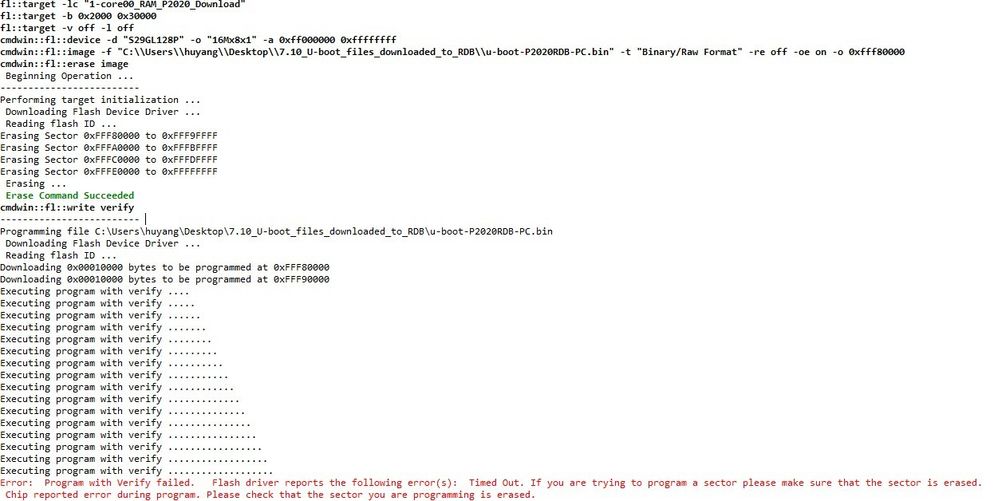
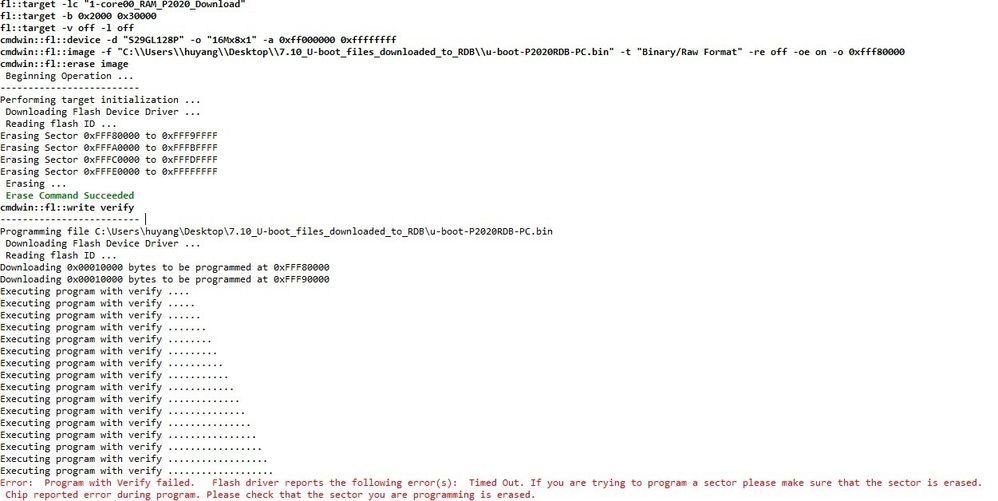
Is the address we set are wrong or there are other mistakes?
Please help us, Thanks
解決済! 解決策の投稿を見る。
- 新着としてマーク
- ブックマーク
- 購読
- ミュート
- RSS フィードを購読する
- ハイライト
- 印刷
- 不適切なコンテンツを報告
Hi,
Thanks for your specific interpretation.
We finnally found the problem that is our device selection setting is wrong.
We chose the device S29GL128P and the organization of it is 16Mx8x1, and that's the problem.
After we change the setting of the organization to 8Mx16x1, the problem solved.
Thanks again.
Hu

 addiyi
- 新着としてマーク
- ブックマーク
- 購読
- ミュート
- RSS フィードを購読する
- ハイライト
- 印刷
- 不適切なコンテンツを報告
Hi,
To program u-boot on P2020RDB-PCA board, I have followed the steps below:
- Enter in debug mode, using init file: P2020RDB-PC_init_core.tcl and mem file: P2020RDB-PC.mem;
- In Target Tasks, import: P2020DS_NOR_FLASH.xml
- In Add Program / Verifiy Action: check Erase sectors before program + Verify after program + Apply Address Offset (with address: 0xFFF80000)
- Switches on the board: SW2: OFF ON ON ON ON ON OFF ON and SW3: ON ON OFF OFF ON OFF ON OFF
Using setup above, I was able to program u-boot with no error.
Adrian
- 新着としてマーク
- ブックマーク
- 購読
- ミュート
- RSS フィードを購読する
- ハイライト
- 印刷
- 不適切なコンテンツを報告
Hi,
Thanks for your specific interpretation.
We finnally found the problem that is our device selection setting is wrong.
We chose the device S29GL128P and the organization of it is 16Mx8x1, and that's the problem.
After we change the setting of the organization to 8Mx16x1, the problem solved.
Thanks again.
Hu
