
- Forums
- Product Forums
- General Purpose MicrocontrollersGeneral Purpose Microcontrollers
- i.MX Forumsi.MX Forums
- QorIQ Processing PlatformsQorIQ Processing Platforms
- Identification and SecurityIdentification and Security
- Power ManagementPower Management
- Wireless ConnectivityWireless Connectivity
- RFID / NFCRFID / NFC
- Advanced AnalogAdvanced Analog
- Neural Processing UnitsNeural Processing Units
- MCX Microcontrollers
- S32G
- S32K
- S32V
- MPC5xxx
- Other NXP Products
- S12 / MagniV Microcontrollers
- Powertrain and Electrification Analog Drivers
- Sensors
- Vybrid Processors
- Digital Signal Controllers
- 8-bit Microcontrollers
- ColdFire/68K Microcontrollers and Processors
- PowerQUICC Processors
- OSBDM and TBDML
- S32M
- S32Z/E
-
- Solution Forums
- Software Forums
- MCUXpresso Software and ToolsMCUXpresso Software and Tools
- CodeWarriorCodeWarrior
- MQX Software SolutionsMQX Software Solutions
- Model-Based Design Toolbox (MBDT)Model-Based Design Toolbox (MBDT)
- FreeMASTER
- eIQ Machine Learning Software
- Embedded Software and Tools Clinic
- S32 SDK
- S32 Design Studio
- GUI Guider
- Zephyr Project
- Voice Technology
- Application Software Packs
- Secure Provisioning SDK (SPSDK)
- Processor Expert Software
- Generative AI & LLMs
-
- Topics
- Mobile Robotics - Drones and RoversMobile Robotics - Drones and Rovers
- NXP Training ContentNXP Training Content
- University ProgramsUniversity Programs
- Rapid IoT
- NXP Designs
- SafeAssure-Community
- OSS Security & Maintenance
- Using Our Community
-
- Cloud Lab Forums
-
- Knowledge Bases
- ARM Microcontrollers
- i.MX Processors
- Identification and Security
- Model-Based Design Toolbox (MBDT)
- QorIQ Processing Platforms
- S32 Automotive Processing Platform
- Wireless Connectivity
- CodeWarrior
- MCUXpresso Suite of Software and Tools
- MQX Software Solutions
- RFID / NFC
- Advanced Analog
- Neural Processing Units
-
- NXP Tech Blogs
- Home
- :
- CodeWarrior
- :
- QorIQ用CodeWarrior
- :
- PBL will not generate with CRC Check as first PBI command
PBL will not generate with CRC Check as first PBI command
- RSS フィードを購読する
- トピックを新着としてマーク
- トピックを既読としてマーク
- このトピックを現在のユーザーにフロートします
- ブックマーク
- 購読
- ミュート
- 印刷用ページ
PBL will not generate with CRC Check as first PBI command

- 新着としてマーク
- ブックマーク
- 購読
- ミュート
- RSS フィードを購読する
- ハイライト
- 印刷
- 不適切なコンテンツを報告
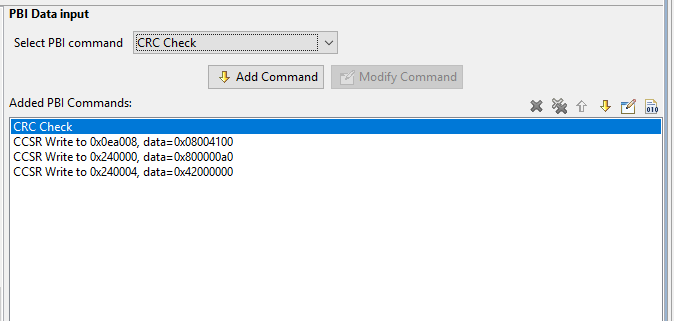
When trying to generate the PBL component using using the QorIQ Configuration suite, I am attempting to insert a CRC check immediately following the RCW contents, but if I do so, generating the code will error out. The error message is "Generator: FAILURE: Unexpected status of script: Drivers\QorIQ\PBM_QorIQ.drv, please contact Freescale support." If I place the CRC Check PBI command anywhere else, the code generates without error. Has anyone experienced this problem and how can it be resolved?
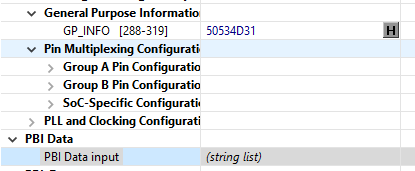
Update 1: It looks like if I were to change the GP_INFO field, I can find other values that will allow me to generate the PBL component with a CRC check immediately following the RCW contents and others not. One example is if I set the GP_info field to 0x50534D31 along with the rest of my RCW parameters and it will give me an error. If I were to change the GP_info field to 0x33707435, then the PBL generates just fine with the CRC check as the first added PBI command.
 yipingwang
- 新着としてマーク
- ブックマーク
- 購読
- ミュート
- RSS フィードを購読する
- ハイライト
- 印刷
- 不適切なコンテンツを報告
Hello Brian Ross,
Which version QCVS tool are you using?
Which version processor are you using? PowerPC or ARMv8?
Would you please provide an example to show where and how you inserted a CRC check immediately following the RCW contents in the PBL project? Would you please provide a screenshot?
Thanks,
Yiping
- 新着としてマーク
- ブックマーク
- 購読
- ミュート
- RSS フィードを購読する
- ハイライト
- 印刷
- 不適切なコンテンツを報告
Thanks for the reply yipingwang.
Which version QCVS tool are you using? I'm using QCVS 4.3.0.0001-20150714.
Which version processor are you using? PowerPC or ARMv8? I am using a PowerPC T2080.
Would you please provide an example to show where and how you inserted a CRC check immediately following the RCW contents in the PBL project? Would you please provide a screenshot? I am using the QorIQ Configuration and Validation suite GUI and click the (string list) field of the GUI to open up the PBI Data input window as shown in the screenshots below.
 yipingwang
- 新着としてマーク
- ブックマーク
- 購読
- ミュート
- RSS フィードを購読する
- ハイライト
- 印刷
- 不適切なコンテンツを報告
Hello Brian Ross,
Please download install the latest QCVS for PA 4.5, please login NXP Semiconductors | Automotive, Security, IoT , please click My NXP->Software Licensing and Support->Software accounts->NXP Software->QorIQ Configuration and Validation Enablement Suite->QCVS offline installation packages for CodeWarrior for Power Architectures Rev 4.5.
Thanks,
Yiping
