
- Forums
- Product Forums
- General Purpose MicrocontrollersGeneral Purpose Microcontrollers
- i.MX Forumsi.MX Forums
- QorIQ Processing PlatformsQorIQ Processing Platforms
- Identification and SecurityIdentification and Security
- Power ManagementPower Management
- Wireless ConnectivityWireless Connectivity
- RFID / NFCRFID / NFC
- Advanced AnalogAdvanced Analog
- Neural Processing UnitsNeural Processing Units
- MCX Microcontrollers
- S32G
- S32K
- S32V
- MPC5xxx
- Other NXP Products
- S12 / MagniV Microcontrollers
- Powertrain and Electrification Analog Drivers
- Sensors
- Vybrid Processors
- Digital Signal Controllers
- 8-bit Microcontrollers
- ColdFire/68K Microcontrollers and Processors
- PowerQUICC Processors
- OSBDM and TBDML
- S32M
- S32Z/E
-
- Solution Forums
- Software Forums
- MCUXpresso Software and ToolsMCUXpresso Software and Tools
- CodeWarriorCodeWarrior
- MQX Software SolutionsMQX Software Solutions
- Model-Based Design Toolbox (MBDT)Model-Based Design Toolbox (MBDT)
- FreeMASTER
- eIQ Machine Learning Software
- Embedded Software and Tools Clinic
- S32 SDK
- S32 Design Studio
- GUI Guider
- Zephyr Project
- Voice Technology
- Application Software Packs
- Secure Provisioning SDK (SPSDK)
- Processor Expert Software
- Generative AI & LLMs
-
- Topics
- Mobile Robotics - Drones and RoversMobile Robotics - Drones and Rovers
- NXP Training ContentNXP Training Content
- University ProgramsUniversity Programs
- Rapid IoT
- NXP Designs
- SafeAssure-Community
- OSS Security & Maintenance
- Using Our Community
-
- Cloud Lab Forums
-
- Knowledge Bases
- ARM Microcontrollers
- i.MX Processors
- Identification and Security
- Model-Based Design Toolbox (MBDT)
- QorIQ Processing Platforms
- S32 Automotive Processing Platform
- Wireless Connectivity
- CodeWarrior
- MCUXpresso Suite of Software and Tools
- MQX Software Solutions
- RFID / NFC
- Advanced Analog
- Neural Processing Units
-
- NXP Tech Blogs
- Home
- :
- CodeWarrior
- :
- CodeWarrior Development Tools
- :
- CodeWarrior 8.3 USB TAP to DSP56F807
CodeWarrior 8.3 USB TAP to DSP56F807
- Subscribe to RSS Feed
- Mark Topic as New
- Mark Topic as Read
- Float this Topic for Current User
- Bookmark
- Subscribe
- Mute
- Printer Friendly Page
CodeWarrior 8.3 USB TAP to DSP56F807

- Mark as New
- Bookmark
- Subscribe
- Mute
- Subscribe to RSS Feed
- Permalink
- Report Inappropriate Content
Hello,
First of all, sorry if this post is repeated. I have not been able to find anything similar in the forum.
I am trying to connect a USB TAP with CodeWarrior to a DSP56F807-PY80. My references are:
- https://www.nxp.com/docs/en/user-guide/CWH-UTP-UG.pdf
- https://www.nxp.com/docs/en/data-sheet/DSP56F807.pdf
- https://community.nxp.com/t5/CodeWarrior-Development-Tools/Windows-7-10-Using-USB-TAP-on-CodeWarrior...
- http://lina.faculty.asu.edu/realdsp/Manuals/Targeting_56800E.pdf
Ok, so I have installed CodeWarrior 8.3 since my target is only supported by this version. I made the connection PC – USB TAP following 3 and 4. The LED TX/RX of my USB tap is blinking in green, so I assume this is good!
I have identified the pins of my target. I have the DSP56F807 build in a board, but this board has a 10 PIN connector. Those pins go through other components (optocouplers and buffers), but if I track the connections with a multimeter and the datasheets of the other components, I get:
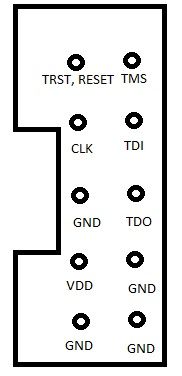
So, I connect this 10 PIN connector to the USB TAP like:
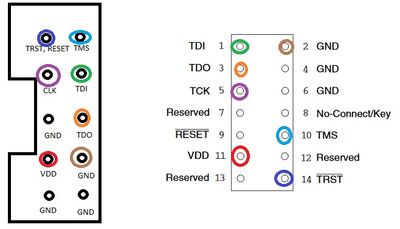
Then, I give power to my board (It needs 25V and 1A). The RUN/PAUSE LED is now red. And when I try to Debug or Debug -> Connect in CodeWarrior 8.3, I get the following error:
CCS Protocol Plugin: Unknown Protocol error
I googled this, and it seems like a physical connection error. But I do not know how to connect everything (I have 10 PINS, and the USB TAP has 14. I can figure out how to connect TRST and RESET since those two go to the same PIN, and the other GND cables, but not the “RESERVED” ones.
Any ideas? Is it a physical connection problem or is it something else? Should I connect directly to the core or can I go through those other components my board has?
Thanks in advance. I hope I have explained myself well enough.
Edit: Just forgot to say that I can connect directly to some of the DSP pins if I want to, not going through those other components. It will be the last option, I would like to use that 10 PIN connector. But I need to know which pins to connect

 xiangjun_rong
- Mark as New
- Bookmark
- Subscribe
- Mute
- Subscribe to RSS Feed
- Permalink
- Report Inappropriate Content
Hi, Julia,
I attach the schematics of DSP56F807 EVM board, pls refer to J3 connector for the JTAG pin assignment.
If you use Win10 64 bits OS, maybe there is problem, you have to replace CCS directory.
I attach the an 4338.pdf.
I suggest you download CodeWarrior for MCU(Eclipse IDE) ver11.x from the link:
and install it on your PC. Because the CodeWarrior for MCU tools dose not support DSP56F807(which is very old, I suppose it was released at 2000 year or later), so you can copy the ccs directory and replace the CCS directory of CodeWarrior DSP56800E tools with it.
Hope it can help you
BR
Xiangjun rong
- Mark as New
- Bookmark
- Subscribe
- Mute
- Subscribe to RSS Feed
- Permalink
- Report Inappropriate Content
Hello,
I am using the CCS from the latest version of CodeWarrior, and I am able to stablish the connection with USB TAP with config cc utap. The TX/RX turns from red to green. When I click on Debug, the CCS API shows that I have accepted and closed the connection. So I guess this part is OK since CodeWarrior 8.3 is connected with my Windows 10.
But I am still having the same error. As lng as I undertand from the evaluation board of the DSP I am using, the PINS 7, 12 and 13 can be unconnected (showing NC from https://www.nxp.com/docs/en/user-guide/DSP56F807EVMUM.pdf). As I said, my core RESET and TRST pins are "wired together" in my board, and they go to the same JTAG PIN.
Is it OK if I connect both USB TAP RESET and TRST to the same JTAG pin? And is it ok if the signals go throught other components before connectiong to the core? Or should them go directly yo it?
Thanks for your reply!
xiangjun_rong
- Mark as New
- Bookmark
- Subscribe
- Mute
- Subscribe to RSS Feed
- Permalink
- Report Inappropriate Content
Hi, Julia,
Now that the 14 pins JTAG connector has TRST signal, I think you'd better connect the TRST pin of DSP56F807 to the pin 14 of 14 pin JTAG connector.
But I think it is okay to connect the TRST to Reset directly.
you'd better connect the TRST pin of DSP56F807 to Low via a pull-down resistor when the DSP56F807 runs standalone.
Hope it can help you
BR
XiangJun Rong
