
- Forums
- Product Forums
- General Purpose MicrocontrollersGeneral Purpose Microcontrollers
- i.MX Forumsi.MX Forums
- QorIQ Processing PlatformsQorIQ Processing Platforms
- Identification and SecurityIdentification and Security
- Power ManagementPower Management
- Wireless ConnectivityWireless Connectivity
- RFID / NFCRFID / NFC
- Advanced AnalogAdvanced Analog
- Neural Processing UnitsNeural Processing Units
- MCX Microcontrollers
- S32G
- S32K
- S32V
- MPC5xxx
- Other NXP Products
- S12 / MagniV Microcontrollers
- Powertrain and Electrification Analog Drivers
- Sensors
- Vybrid Processors
- Digital Signal Controllers
- 8-bit Microcontrollers
- ColdFire/68K Microcontrollers and Processors
- PowerQUICC Processors
- OSBDM and TBDML
- S32M
- S32Z/E
-
- Solution Forums
- Software Forums
- MCUXpresso Software and ToolsMCUXpresso Software and Tools
- CodeWarriorCodeWarrior
- MQX Software SolutionsMQX Software Solutions
- Model-Based Design Toolbox (MBDT)Model-Based Design Toolbox (MBDT)
- FreeMASTER
- eIQ Machine Learning Software
- Embedded Software and Tools Clinic
- S32 SDK
- S32 Design Studio
- GUI Guider
- Zephyr Project
- Voice Technology
- Application Software Packs
- Secure Provisioning SDK (SPSDK)
- Processor Expert Software
- Generative AI & LLMs
-
- Topics
- Mobile Robotics - Drones and RoversMobile Robotics - Drones and Rovers
- NXP Training ContentNXP Training Content
- University ProgramsUniversity Programs
- Rapid IoT
- NXP Designs
- SafeAssure-Community
- OSS Security & Maintenance
- Using Our Community
-
- Cloud Lab Forums
-
- Knowledge Bases
- ARM Microcontrollers
- i.MX Processors
- Identification and Security
- Model-Based Design Toolbox (MBDT)
- QorIQ Processing Platforms
- S32 Automotive Processing Platform
- Wireless Connectivity
- CodeWarrior
- MCUXpresso Suite of Software and Tools
- MQX Software Solutions
- RFID / NFC
- Advanced Analog
- Neural Processing Units
-
- NXP Tech Blogs
- Home
- :
- Model-Based Design Toolbox (MBDT)
- :
- Model-Based Design Toolbox (MBDT)
- :
- Question about communication equipment provided by RAppID BL Tool?
Question about communication equipment provided by RAppID BL Tool?
- Subscribe to RSS Feed
- Mark Topic as New
- Mark Topic as Read
- Float this Topic for Current User
- Bookmark
- Subscribe
- Mute
- Printer Friendly Page

- Mark as New
- Bookmark
- Subscribe
- Mute
- Subscribe to RSS Feed
- Permalink
- Report Inappropriate Content
Hi
I am interested in developing target boards using Motor Control Toolbox.
Basic my environment
--------------------
MCU: MC9S12ZVMC128
Target Board: Self-developed board
External communication port: CAN only. (Serial port not created.)
My CAN device: Vector VN7600
--------------------
Question
I have confirmed that there are three options to support RAppID BL Tool's Comm Mode setting (Serial port, Vector CANCaseXL, Vector CANCardXLE).
Can not connect to Vector VN7600 .?
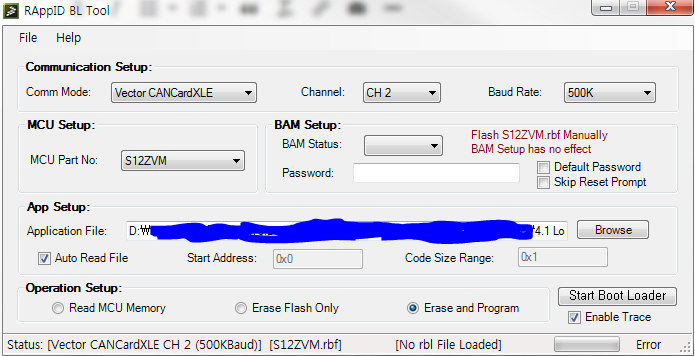
Solved! Go to Solution.
- Mark as New
- Bookmark
- Subscribe
- Mute
- Subscribe to RSS Feed
- Permalink
- Report Inappropriate Content
Hi Daniel~
I solved this problem by updating the latest version of RAppID(version 1.6.7.35).
The VN7600 is working well.
Perhaps the version of the S12ZVM.rbf file (version 1.6.2.14) I downloaded from CW seems to be wrong.
Thank you very much.
- Mark as New
- Bookmark
- Subscribe
- Mute
- Subscribe to RSS Feed
- Permalink
- Report Inappropriate Content
Hi Daniel~
I solved this problem by updating the latest version of RAppID(version 1.6.7.35).
The VN7600 is working well.
Perhaps the version of the S12ZVM.rbf file (version 1.6.2.14) I downloaded from CW seems to be wrong.
Thank you very much.

 Daniel_Popa
- Mark as New
- Bookmark
- Subscribe
- Mute
- Subscribe to RSS Feed
- Permalink
- Report Inappropriate Content
I'm glad to see you managed to fix it - something to learn for this experience.
- Mark as New
- Bookmark
- Subscribe
- Mute
- Subscribe to RSS Feed
- Permalink
- Report Inappropriate Content
Hi Daniel
I am always thankful for your kindness.
I proceeded as you advised yesterday, but the connection was not successful.
------------------------------------------------------------------------------------------------------------
Questions
1. To explain what I have done,
Step1~3 : I checked Step 1 ~ 3.

Step 4~5 :
I have already read RAppIDBL_UserManual.pdf and have configured the Vector HW Configuration.
When running the Start Boot Loader of the RAppID BL Tool, the message "RAppID_BL :, Init.Activated" appears in the Channel 2 Status of the Vector HW Config window. However, the BAppID BL Tool outputs the following message.
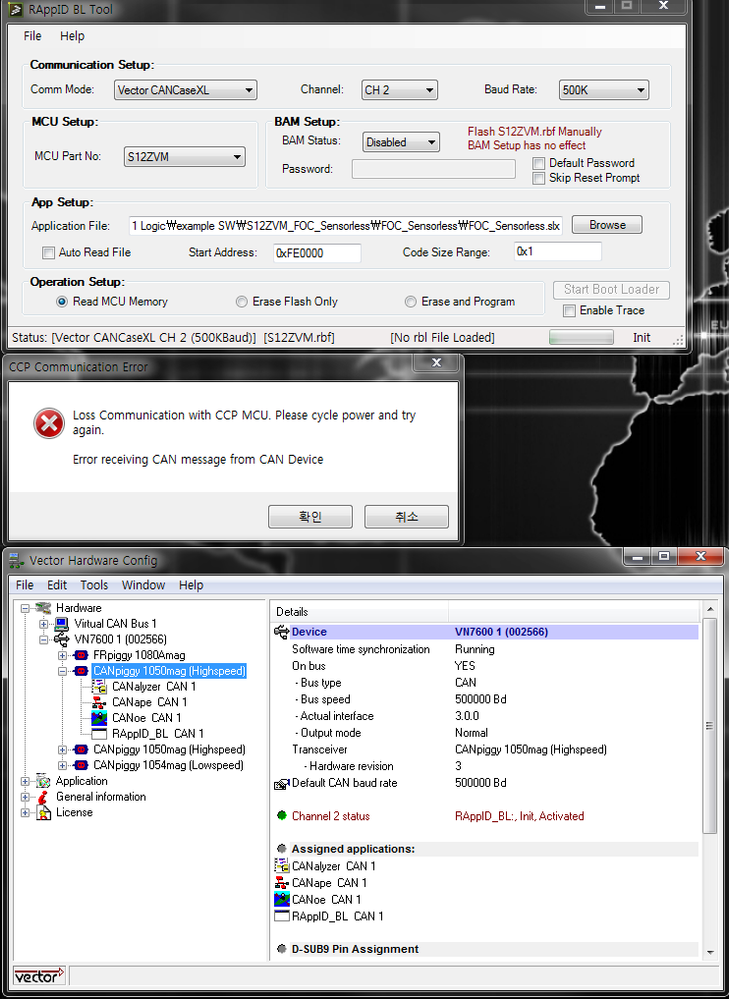
Is there anything else I should check it?
2. In the document "Motor Control Toolbox for MagniV_Matlab_simulink modeling and code generation", The first step is to load the flash bootloader using CW Flash Programmer.
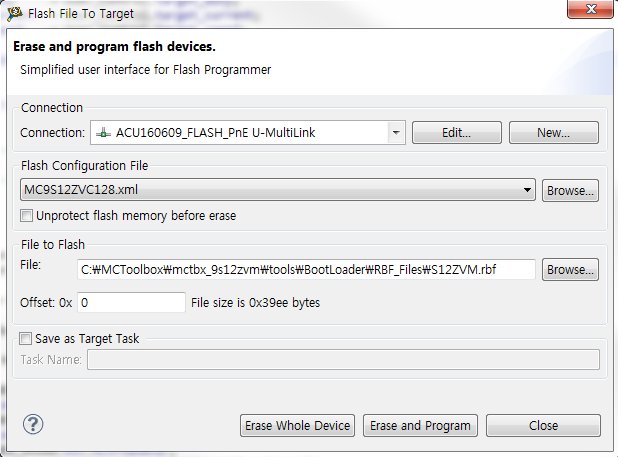
The following message appears in the CW console window.
fl::target -lc "LC for Simple Flash (1)"
fl::target -b 0x1000 0x800
fl::target -v off -l off
cmdwin::fl::device -d "MC9S12ZVC128_FLASH" -o "128Kx32x1" -a 0xfd0000 0xfeffff
cmdwin::fl::image -f "C:\\MCToolbox\\mctbx_9s12zvm\\tools\\BootLoader\\RBF_Files\\S12ZVM.rbf" -t "Auto Detect" -re on -r 0xfd0000 0xfeffff -oe off
cmdwin::fl::erase image
Beginning Operation ...
-------------------------
Auto-detection is successful.
File is of type Motorola S-Record Format.
Image size is 0 bytes, nothing to erase.
Nothing to erase. No sectors selected
Performing target initialization ...
Erase Command Succeeded.
cmdwin::fl::write
Beginning Operation ...
-------------------------
Flash Operation. ...
Auto-detection is successful.
File is of type Motorola S-Record Format.
Device MC9S12ZVC128_FLASH
Detect frequence ...
Frequence 5471.63 Khz
Programming ....
Programming warning. Can't program 8 bytes to address 0xfffe08 because this range isn't included in the selected modules!
Programming .....
Device MC9S12ZVC128_FLASH
Program Command Succeeded
Flash Operation. done
cmdwin::fl::device -d "MC9S12ZVC128_EEPROM" -o "2Kx32x1" -a 0x100000 0x1007ff
cmdwin::fl::image -f "C:\\MCToolbox\\mctbx_9s12zvm\\tools\\BootLoader\\RBF_Files\\S12ZVM.rbf" -t "Auto Detect" -re on -r 0x100000 0x1007ff -oe off
cmdwin::fl::erase image
Beginning Operation ...
-------------------------
Auto-detection is successful.
File is of type Motorola S-Record Format.
Image size is 0 bytes, nothing to erase.
Nothing to erase. No sectors selected
Erase Command Succeeded.
cmdwin::fl::write
Beginning Operation ...
-------------------------
Flash Operation. ...
Auto-detection is successful.
File is of type Motorola S-Record Format.
Device MC9S12ZVC128_EEPROM
Programming ....
Programming warning. Can't program 8 bytes to address 0xfffe08 because this range isn't included in the selected modules!
Programming .....
Device MC9S12ZVC128_EEPROM
Program Command Succeeded
Flash Operation. done
Is the file flash correct?
Daniel_Popa
- Mark as New
- Bookmark
- Subscribe
- Mute
- Subscribe to RSS Feed
- Permalink
- Report Inappropriate Content
Hi eungsoo Lee,
Regarding #1, i see you have done all the configurations correctly. I think is safe to say that RAppID BL is not currently supporting the device you are using and that is the main reason for the failure your are seeing.
You might want to add a service request to ask for a new feature to add support for other Vector Devices like yours here: Sales and Support|NXP at Support Requests
Is is a hazard to add a serial port on your board ? or to get another CAN device that is officially supported by our application ?
Regarding #2,
It should be ok. That address belongs to the vector table but the interrupts gets disabled in the Bootloader - so may not be a problem.
Hope it helps!
Daniel
- Mark as New
- Bookmark
- Subscribe
- Mute
- Subscribe to RSS Feed
- Permalink
- Report Inappropriate Content
Thank you for your answer.
But I have not been able to connect to my board yet.
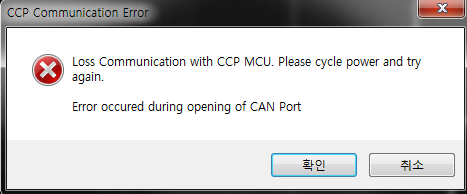
please Check the my RAppID BL Tool window
(CAN Test SW downloaded with Jtag works well...ㅠㅠ)
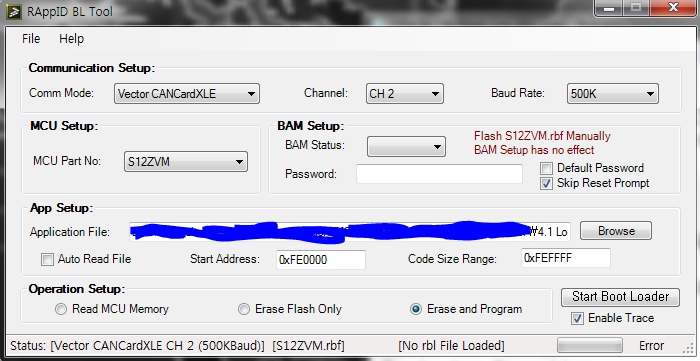
Comm mode : Vector CANCardXLE
Channel : CH2 (CH1 of VN7600 is assigned to FlexRay.)
Raud Rate : 500k
When I run the Start Boot Loader button to display the following message.(ㅜㅜ...)
------------------------------------------------------------------------------------------------------
Question
1. when you connect using VN1610, Is Comm Mode set to Vector CANCardXLE?
2. Is there any other way I can verify that CAN communication is connected?
Daniel_Popa
- Mark as New
- Bookmark
- Subscribe
- Mute
- Subscribe to RSS Feed
- Permalink
- Report Inappropriate Content
Hi eungsoo Lee,
Regarding your questions:
1. when you connect using VN1610, Is Comm Mode set to Vector CANCardXLE?
ANS: CANCardXLE option is used for Vector boards that are connected over the PCI with the Host PC.
For Vector devices that are connected via USB you should use the "CaseXL" option.
2. Is there any other way I can verify that CAN communication is connected?
ANS: One simple way - is to create a small program that broadcast a CAN message from the processor. This way you will validate that the CAN msgs will go out.
Now, coming back your error:
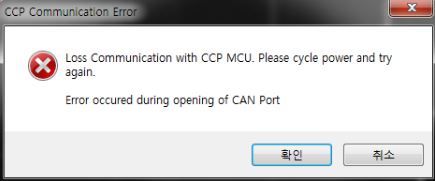
It looks like you have not configured the setup correctly because the RAppID is not able to connect with the Vector Devices.
In the RAppIDBL_UserManual.pdf there is a chapter called "Enabling Vector Hardware" where you need to open the Vector Hardware Config application and assign RAppID_BL to one of the CAN channels. Have you configured this step ?
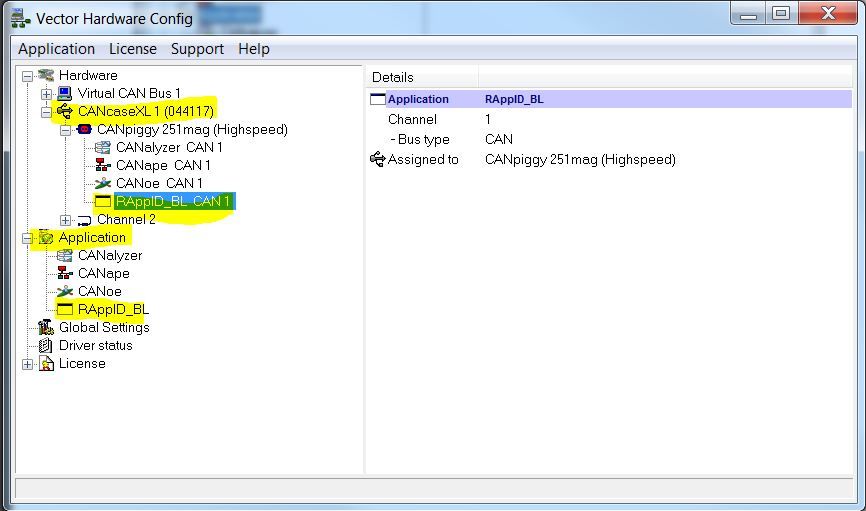
To conclude, i would approach this problem as:
- step#1: build an application that will transmit a counter value over CAN all the time (infinite loop).
- step#2: then load this applicaiton via JTAG
- step#3: using any CAN device i would check that i can receive those messages and decode them correctly. This will ensure the CAN baud rate and CAN network is OK (perhaps you need to lower the CAN speed and/or add a 120ohm termination resistor)
- step4#: configure the RAppID Bootloader download the code via Serial (this will validate that your code will fit into S12ZVM flash.
- step5#: configure the RAppID Bootloader to use the Vector device and then download the code via CAN interface
Hope this helps!
Best regards,
Daniel
Daniel_Popa
- Mark as New
- Bookmark
- Subscribe
- Mute
- Subscribe to RSS Feed
- Permalink
- Report Inappropriate Content
Lee,
Unfortunately, we do not have a VN7600 device to test the boot loader against. We tried with CAN VN1630 and the boot loader worked well.
In general, if Vector kept the same driver API it should work with other devices from the same manufacturer.
Nonetheless, have you tried to download via this CAN VN7600 and it fails? As a hint, the Start Address of application code should start from 0xFE0000 with the S12ZVMC128.
